Is it Practical to Use Cat6 Cable?

26 Apr 2015

cat 6,structured cabling, Data CablingData volume has grown extensively. Also, the processing capacity to users continues to get grow. Specialists in data management forecast that information production will be 44 times larger in five years with enterprises needing to process and safeguard 80 percent of the new data.


Data Cables


For these reasons, you might need to become more familiar with different types of cabling. There is Category 5 (Cat5) cable but it is only capable of transmitting 1000 megabits data rate per second on an Ethernet network. Transfer of data demands are increasing due to new and more sophisticated applications. That is why many companies prefer to work with Category 6 (Cat6) cables. Cat6 has a maximum data transfer of 10,000 megabits per second. Cat6 is also backward compatible which means your Cat5 connectors will plug i and work (at the lower speeds).


Future Proofing


Cat6 infrastructure guarantees that your system will be relevant well into the future. This allows users to easily cope with any modifications, new features or technological developments. The Cat5 standard has been used for a long time. However, your enterprise needs adequate bandwidth to handle these continuing and future changes. It is not merely a possibility or “let's say” situation. It is to be anticipated as the online experience continues to progress.


Demand for Cat6 escalates as the world-wide web is now offering premium video streams, online applications, highly-responsive and media-heavy portals.  If you decide to upgrade to a more reliable network, consider Cat6 cables. It is fast becoming the new standard in this industry.


Downsides


Cat 6 is more costly compared to Cat5e cables. On average, we are finding that projects cost about 20-25% more. This is because you are not guaranteed full speed unless all the components operate at gigabit speed. So, you need Cat6 cable, connectors, patch panels and Gigabit switches too. If one part is not rated as gigabit, the network will run at Cat5e speeds. Call or contact us to help you make this decision.


Nevertheless, experts say Cat6 will sooner or later surpass Category 5e.  And the initial upfront costs will pay future productivity gains for many, many years to come.
 
Data Cabling, Fiber optic cable

Fiber Optic Cabling for PC Networks

17 Apr 2015

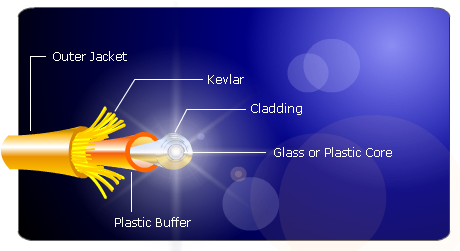
 Data Cabling, Fiber optic cableIt is not easy to install fiber optic cables for computer networks. Fiber optic cabling components consist of the core, buffer, cladding, and jacket. Some cables also have copper conductors to provide power for repeaters. Nonetheless, installation should only be performed by experts. The first step is to determine the cable that you want to use. The second is to learn the procedures of fiber optic cable installation.


Varieties of Fiber Optic Cables


Multi-mode fiber optic cable is meant for short distances or a maximum of 1,800 feet. It can transfer 10 gigabits of data per second. The single-mode fiber optic cable costs more. Yet, it has the capacity to convey the same 10 gigabits up to 37 miles. The first option is recommended for residences and small offices since there is really no need to cover such long distances.


How do you begin an installation? Prepare the switches and devices for the office PCs as well as at the faceplate for your future fiber solution. Connect the computer cable to the outlet and hubs/routers to the desktop. Attach a fiber optic cable to the router and hook it up to the second computer (if there is one). The cable must not be too tight so you can unplug it without difficulty. Secure the cables properly. Rather than replacing the existing 10BaseT network card. Leave it installed and install a new separate fiber network adapter. That will help make the transition is smoother.


You will need a media converter for devices without fiber optic outlets. It transforms light pulses into low voltage data. Plug the computer into the network using a Universal Serial Bus (USB) adapter and an Ethernet cable. Connect the workstation without the fiber optic outlet into your converter. Now, you can turn on all apparatus linked to the network.


Upkeep Techniques


Minimal maintenance is required for household networks. Simply make sure that cables are not damaged or disconnected. Cables should be bundled neatly to prevent damage. Keep these out of the reach of youngsters and pets. Puppies love to chew cables! Fiber optic cable speeds can be degraded by dust, scratches and humidity. Try to buy a cheap laser pointer to check if your cables are functioning efficiently. Position the laser at one edge of the cable and find out if the other point lights up. If it lights, the cable conducts light well. Otherwise, it is time to clean or replace the fiber optic cable. Also check your outdoor cables often since they are more susceptible to damage.


Fiber optics provide much higher speed and clear data signals compared to conventional copper cabling. Indeed, fiber optics is a terrific solution if you need more speed to your Server or for your Internet apps. And even though the cost is quite high, you are assured of a high value for your investment.

Data Cabling ,Network cabling, DC

Essential Components for Wired Networks

10 Apr 2015

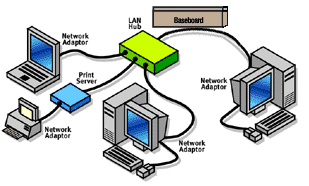
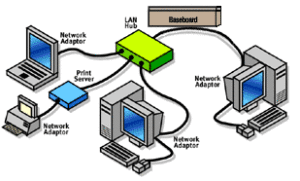
Data Cabling ,Network cabling, DCBe sure to purchase the correct components before you install a wired network. The major components consist of the cable, router and network adapters.


Cables


You should opt for fast Ethernet or the 100 Base T cable. Ethernet (RJ-45) looks like telephone cables with somewhat thicker wire and jacks. It is also known as Cat 5e or Twisted Pair Ethernet with corresponding speed ratings of 10, 100, and 1,000. Every PC requires a separate network adapter.

Read More

Directions in Telecommunications and Cabling

3 Apr 2015

 Data Cabling ,Network cabling, DCThe telecommunications industry continues to advance. And bandwidth demands will continue to increase. Meanwhile, conditions to convey considerable amounts of information quickly are changing. Applications including graphic information, technical modeling, video conferencing, and multi-level online databases will certainly increase bandwidth requisites. The bottom line is demand for higher transfer speed for information is expected to rise.


Properties for Cabling Systems


Two principal properties needed for cabling systems are performance and easy installation. Fiber and shielded twisted-pair provide stronger signals compared to Unshielded Twisted Pair (UTP) although these two lagging in client acceptance. The question is will UTP provide the appropriate bandwidth for modern applications?


Unshielded Twisted Pair


UTP is considered the most prevalent cable worldwide for telecommunications and networking. Cat 5e is the most popular and it long ago replaced coaxial cable which failed to keep up with more dependable and faster networks. UTP is also easy to install, develop and troubleshoot. Unshielded Twisted Pair cabling does not have any foil covering. It depends on twisted pairs inside the cable to prevent electromagnetic interference. UTP is used extensively for local area networking and comparable cabling configurations. Hence, installation is easier and less expensive.


Shielded Twisted Pair


Shielded twisted Pair (STP) features a metallic foil enclosing twisted wire pairs inside the cable. This is the safeguard against electromagnetic intervention which facilitates rapid data transmission. STP functions by drawing electromagnetic interference and counterbalancing this with grounded cabling. The drawback is that if the cable is not grounded correctly it loses the capacity to prevent unnecessary noise. STP is also larger and more sensitive compared to UTP cables. Expert cable installers use this cabling for industrial environments where adjacent equipment emit significant amounts of elctron-magnetic interference (EMI). Actually, UTP and STP can perform well if installed and maintained by efficient cabling providers.


Transmission is Essential


Transmission should be balanced. This is the standard for conduction of data using twisted cabling pairs. Separate protection for balanced twisted pairs is designed to enhance resistance and emission of the communication lines. The shielding method produces a conductive barrier that lessens these electromagnetic waves. It also creates a conduit for conduction so that currents and can pass data through without any obstruction. Shielding can be performed on individual pairs or as one set of pairs.


Please contact us if you have any questions or concerns or if you need a free quote on your cabling project.