cabling installations,cable

Typical Installation Mistakes of Network Cabling – Part 2
31 Jul 2018

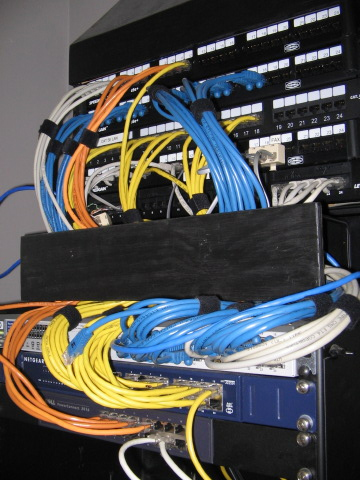
cabling installations,cableAs discussed in Part 1, network cabling installation errors may result in long-term problems and high costs. They can be avoided by following standard structured cabling practices. Continuing with the discussion of typical network cabling installation mistakes, Part 2 will cover Ignoring Regulations, No Testing, and Skimping On Labor.


Ignoring Regulations


There are codes, laws, and ordinances that regulate low voltage cabling, and they vary, depending on the municipality, city, and state. Experienced professionals who install network cabling are knowledgeable about the applicable requirements and how to complete a project to code. When the fire marshal or building inspector determines laws were broken or wiring is not up to code, a company can be penalized with large fines and required to remove and reinstall cabling if it is a fire hazard.


No Testing


When network cabling is installed, each cable should undergo testing. This should also involve the verification of a cable’s length and specifications. This process is crucial because it will confirm whether or not the network satisfies project specifications. The data also provides a basis for future testing and troubleshooting, along with supporting any warranty claims.


Skimping On Labor


Considering how important the network cabling installation is to the future, cutting corners in the hiring of cabling installers is unwise. It is crucial to always verify the qualifications and licensing of the cabling installation company you are considering. Make the time and effort to check each reference that is provided. This may save your company time, money, and problems if you avoid working with an outfit that provides substandard services support. Request the contact information of previous customers who had projects similar to yours and get their opinions before making a commitment. Finding an installer that is the right fit for your project is the first step for ensuring a successful network cabling installation.


Progressive Office Cabling


Founded in 1986, Progressive Office’s success has been a direct result of years of commitment to seeking solutions on behalf of our clients in the Washington, D.C. and New York City areas. Efficiently working together, Progressive teams get cabling installed and operating as fast as possible while minimizing disruption and downtime. Call our toll free number (800) 614-4560 today.
Cabling Installations New York City Atlanta GA

Get a Site Survey Before Cabling Installation

7 Feb 2018

Cabling Installation , Network Cabling New York City Atlanta GADuring the process of selecting a cabling installation company, you will meet with candidate contractors at the new office space. Each visit will typically be a free consultation as each contractor they will make a site survey in order to make an evaluation and prepare a quote for the project. Below are items and information a business owner should be ready to provide to make each site survey as efficient and productive as possible. 

Read More

Cable Installation, Cabling, Washington D.C.

Ethernet Crossover Cable Basics

24 Jan 2018

Cable Installation, Cabling, Washington D.C.The crossover cable connects two Ethernet network devices to each other. They were invented for temporarily supporting host-to-host networking when a network router or another intermediary device is not available. Although crossover cables appear the same as a standard straight-through (patch) Ethernet cable, their internal wiring structures are different.


Straight Through vs. Crossover


A straight-through cable is used for connecting two different kinds of devices, such as a network switch to a computer. In contrast, a crossover cable is for connecting two devices that are identical.


The straight-through cable’s ends can be wired in any manner, but both ends must be identical. This is different from the crossover cable’s internal wiring, which reverses the signals for receiving and transmitting. The first and third wires and the second and sixth wires are crossed.


High-quality Ethernet crossover cables have special markings which allow users to distinguish them from straight-through cables. They are often red in color and the word "crossover" will appear on its casing and packaging.


Crossover Cable Needs


Crossover cables came into use during the 1990s and 2000s because the most common types of Ethernet were unable to support direct cable connections between hosts. Intended for using specific wires for both receiving and transmitting signals, the original and Fast Ethernet standards required the communication of two endpoints through an intermediary device to avoid conflicts.


The Ethernet feature MDI-X has auto-detection for the prevention of signal conflicts, enabling the Ethernet interface to automatically determine and negotiate the expected signaling convention of the device at the other end of the cable. The majority of home broadband routers and Gigabit Ethernet adopted MDI-X.


As a result, crossover cables are only necessary for the connection of two Ethernet client devices if they are not configured for Gigabit Ethernet. Nowadays, Ethernet devices are compatible with crossover cables because they can automatically detect them.


Ethernet Crossover Cables Usage


Crossover cable usage should be limited to direct network connections. When a user tries connecting a computer to an antiquated router or network switch via a crossover cable rather than a standard cable, the link can be prevented from working.


Progressive Office Cabling


Founded in 1986, Progressive Office’s success has been a direct result of years of commitment to seeking solutions on behalf of our clients in the Washington, D.C. and New York City areas. Efficiently working together, Progressive Office teams get cabling installed and operating as fast as possible while minimizing disruption and downtime. Call our toll free number (800) 614-4560 today.
Structured Cabling,Network Cabling ,Data Cabling Washington DC

Basics and Benefits of Zone Cabling – Part 3

20 Dec 2017

Structured Cabling,Network Cabling ,Data Cabling Washington D.CAs discussed in Part 2, there are considerable cost savings from the deployment of zone cabling systems. Part 3 will continue discussing the basics and benefits of zone cabling.


Additional Zone Cabling Benefits


  1. Additional IP devices for audio & video, BAS, digital signage, voice, data security, digital signage, WAPs (wireless application protocols), etc. can be integrated easily into the current structured cabling system through ZE (zone enclosure) connections.

  2. Extra ports within the ZE facilitate fast MACs (moves, adds, and changes) of current service configurations.

  3. For easing installation and decreasing labor costs, tested trunking and factory pre-terminated cables can be utilized.

  4. Increased efficiency of pathway utilization will be realized for the entire facility space.

  5. Structured cabling system deployment will be speedier and cause less disruption.


Smart & Green Building Designs


Perfect for smart and green building designs, zone cabling systems can reduce labor expenses and waste of cabling materials. Centralized connections inside ZEs achieve greater efficiency for the routing of pathways. LEED credits provided by the United States Green Building Council (USGBC) can be maximized. In addition, cable sharing can support several low-speed and low pair count applications functioning on a single 4-pair cabling system. This achieves greater efficiency in cable and pathway utilization.


Summary


Modern workspaces are becoming more social and flexible, and they are increasingly reconfigured and updated with greater frequency.


Zone cabling systems allows flexibility in work spaces, facilitating faster and less disruptive moves, adds, and changes than traditional cabling systems.


Zone cabling allows for greater efficiency in the use of pathways and materials, which is required for smart and green building designs.


CAT 6A shielded cabling is recommended in zone cabling designs to achieve maximum performance.


Shielded CAT 6A zone cabling designs result in greater performance, better support of remote powering applications, and ZE termination flexibility at practically no additional cost in comparison to CAT 6A UTP designs.


Regardless of size, zone cabling installations planned with 25% spare port availability will considerably decrease client disruption and allow the facility owner to recover the expense for extra ports inside two to five years or after achieving the threshold for ROI.


Progressive Office Cabling


Founded in 1986, Progressive Office’s success has been a direct result of years of commitment to seeking solutions on behalf of our clients in the Washington, D.C. and New York City areas. Efficiently working together, Progressive teams get cabling installed and operating as fast as possible while minimizing disruption and downtime. Call our toll free number (800) 614-4560 today.

Network Cabling,Cat6 Cable New York City

Basics and Benefits of Zone Cabling – Part 2

14 Dec 2017

Network Cabling,Cat6 Cable New York City As mentioned in Part 1, zone cabling designs provide benefits in materials savings, decreased installation times, and easier MACs (moves, adds, and changes). Part 2 will continue discussing the basics and benefits of zone cabling.


Designs


Experts recommend CAT 5e and 6 UTP (unshielded twisted pair) zone cabling topology with a connecting block system within the ZE (zone enclosure). This configuration will render unnecessary the stocking of factory pre-terminated and tested interconnect cords for connections in the ZE, simplifying cable management through the elimination of cable slack.


Please note that CAT 6A UTP media is not recommended for zone cabling due to reasons involving performance and flexibility. UTP cabling is vulnerable to crosstalk in particular installation scenarios. In addition, it is not the best media for supporting remote power applications with loads of 30W or more. Because CAT 6A UTP zone deployment is dependent on modular connections inside the ZE, connections provided by pre-terminated and tested interconnect cords need to be available for rapidly enabling MACs. Affordable shielded zone cabling solutions are recommended to address these situations.


Cost Savings


Even though more CAPEX (capital expenditure) will be necessary for a zone cabling installation, assessing total costs should also account for OPEX (operating expenditure). The performance of MACs is classified as OPEX, and studies by Siemon found there are hundreds of dollars in savings from each move, addition, or change when using a zone cabling design versus a traditional cabling design. Their study also discovered a tipping point when ROI begins accruing from utilizing a zone cabling design.


IT (information technology) needs for many organizations evolve constantly, which requires being able to quickly reconfigure floor space. An improved capability of supporting MACs will allow owners of facilities to achieve considerable ROI benefits from deploying zone cabling systems in a two to five year period. According to Siemon, the combined costs of CAPEX and OPEX for zone cabling designs will be invariably less than traditional cabling designs


Part 3 will continue discussing the basics and benefits of zone cabling.


Progressive Office Cabling


Founded in 1986, Progressive Office’s success has been a direct result of years of commitment to seeking solutions on behalf of our clients in the Washington, D.C. and New York City areas. Efficiently working together, Progressive teams get cabling installed and operating as fast as possible while minimizing disruption and downtime. Call our toll free number (800) 614-4560 today.

Cat5 Cat6 Network Cabling,Washington DC

8 Network Cabling Mistakes to Avoid – Part 1

9 Nov 2017

Cat5 Cat6 Network Cabling,Washington DC Improperly installed twisted pair cabling can result in poor network performance, maintenance issues, and concealed expenses. The following article discusses eight network cabling errors to avoid. To get the best results for your cabling project, make sure to consult with a company that is experienced and provides excellent service.


Mistake No. 1: No Future Planning


If your company is moving to a new office space and new cabling will be required, it would be wise to avoid outdated technology and install equipment that will meet both your current and future needs. Labor costs will likely be the costliest aspect of the project. Although high-quality cable will not be cheap, it will be well worth the investment for your firm’s network requirements the next several years.


Mistake No. 2: Poor Cable Management


Implementing rack-based and ladder rack cable management will certainly raise the outlay for a project. However, sound cable management will ease maintenance and decrease downtime. You should be aware that cabling tasks do not end after installation. Additional cables will probably be needed, and configurations may be revised. Use a standard system for labeling and color coding cables for faster and easier identification. Doing so will speed tasks like repair, reconfiguration, and replacement.


Mistake No. 3: Parallel with Electrical Wiring


Generated by low voltage, the magnetic field conducted by data UTP (unshielded twisted pair) cables is an important feature for the conveyance of data. However, when UTP cables run parallel to electric wiring, there will be a disruption of its magnetic field. This results in garbled and noisy communication. Sometimes transmissions completely fail from point to point. Another negative effect is the extreme slowing of transmission.


Mistake No. 4: Nearby Devices and Fixtures


Noise can be introduced onto data cabling by more than just electrical wires. Fluorescent lighting, motors, and similar items that shed electrical or magnetic interference will wreak havoc on your cabling infrastructure as well. Make sure that in your planning, you leave a data cable pathway that avoids these kinds of hazards.


Part 2 will discuss four more network cabling errors to avoid.


Progressive Office Cabling


Founded in 1986, Progressive Office’s success has been a direct result of years of commitment to seeking solutions on behalf of our clients in the Washington, D.C. and New York City areas. Efficiently working together, Progressive teams get cabling installed and operating as fast as possible while minimizing disruption and downtime. Call our toll free number (800) 614-4560 today.

Structured Cabling, Cabling, Washington DC

The 5 Most Common Structured Cabling Errors – Part 1

19 Oct 2017

Structured Cabling, cablesStructured cabling systems are so standardized that good practices should merely entail following ISO/IEC, CENELEC or Telecommunications Industry Association (TIA) documentation for panel and outlet standards, cable pathway standards, maximum cable and patch cord lengths, patch testing standards, etc. Strictly doing so will invariably result in an installation that is professional and trouble free. In addition, as data speeds grow faster and faster, following industry standards becomes even more crucial.


Improperly installed cabling made up of shorter runs, which do not overly stress the system, may function well enough. In addition, data speeds may be quite beneath the cable specification capacity. As an example, CAT5e carrying 100Mbps and capable of 1Gbps will have ample margin of error. However, structured cabling systems still need qualified technicians for proper installation supporting maximum data speeds over the entire network as required.


The following will discuss the five most common errors of structured cabling. Remember to call an experienced and expert cabling installation team to get the best results for your company’s project.


Error No. 1


Considering cables as merely wiring is the first error. They are actually very important electronic components that provide the pathway for data from point to point within a network. These points may be a desktop PC, a network switch, server, router, and wireless access point. When you consider that cables make these connections possible, then you can understand how important it is to make sure that the cabling is of high quality and properly installed.


Error No. 2


Running data cables near power cables is the second error. Even when cables are screened, this practice is unsound. When data cables are running near and parallel to   power cables, noise emitted by power cables may infiltrate data cables. As the load carried by power cables fluctuate, resulting spikes or surges may radiate into the data cables, creating undesired noise decreasing the quality of the data transmission.


Part 2 will discuss three more common errors of structured cabling.


Progressive Office Cabling


Founded in 1986, Progressive Office’s success has been a direct result of years of commitment to seeking solutions on behalf of our clients in the Washington, D.C. and New York City areas. Efficiently working together, Progressive teams get cabling installed and operating as fast as possible while minimizing disruption and downtime. Call our toll free number (800) 614-4560 today.

Cat5e Cat6/6a Cabling,Office Cabling

Data Center Cabling Best Practices – Part 2

13 May 2017

Cat5e Cat6/6a Cabling,Office CablingAs mentioned in Part 1, modern data centers must be flexible, scalable, reliable, and manageable, making best practices required. Part 2 will cover cabling for Modular Data, High Density/High Port Count Fiber Equipment, and Standards.


Modular Data


Increasing in popularity, modular cabling systems for fiber and copper connectivity introduces the plug-and-play concept, which simplifies cable installation and significantly decreases costs and labor. Typically, cables are factory-terminated and tested.


While modular cabling is less costly when the infrastructure is modified in-house, it will not be as flexible because of the possible required commitment to a vendor for ongoing compatibility.


High Density/High Port Count Fiber Equipment


When networking equipment gradually grows in density and port counts rise to several hundred, the proper management of the connected cabling will also require increased effort.


In the past, the direct connection of cables to individual ports of equipment with low port-counts was thought to be manageable. Unfortunately, the same task will be very time consuming for high-density/high-port-count equipment. Eventually, the addition or removal of cables directly connected to these ports will be almost impossible.


The utilization of Multifiber Push-On (MPO) cable assemblies featuring a single connector at one end of cable and multiple duplex breakout cables at the other end will ease cable management.


The concept revolves around pre-connecting high-density/high- port-count Lucent Connector (LC) equipment with LC-MPO fan-out cable to dedicated MPO modules inside a dedicated patch panel. Once completely cabled, this patch panel will work as "remote" ports. Ideally the patch panels should be located on top of the cabling equipment to facilitate access to overhead cabling. This method significantly decreases cluttering of equipment and cables, resulting in improved cable management.


Standards


The ISO (International Organization for Standardization) and TIA (Telecommunications Industry Association) are the main organizations that develop structured cabling standards for the industry. IEEE (Institute of Electrical and Electronics Engineers) committees do the testing and then set performance specifications.


Standards compliance makes sure that systems function at specified levels, allows backward compatibility, and a greater variety of equipment will be available internationally. Widespread global acceptance of standards allows the sourcing and use of equipment manufactured by different countries.


Color Identification and Naming Scheme will be discussed in Part 3.


Union Network Cabling


When union work requires a unionized cabling group, call on Union Network Cabling for your commercial Cat5e/6/6a and fiber cabling projects. Specializing in cabling for data, voice, security and even the latest WiFi and LiFi solutions. Phone: (202) 462-4290

Network Cabling,data cabling,,DC

Comparing Cat 7 to the Other Cats

3 Mar 2017

Data cabling, network cablingNowadays offices and homes utilize either a wireless (Wi-Fi) connection or wired network connection. Usually faster than Wi-Fi, wired connections also have lower latency. These two types of network connection continue to progress technologically, providing users ever increasing speeds.


In the case of home networks, the speed of the internet connection is typically the issue, and the cabling may not be a factor. However, a company must consider the specifications of particular cables and how these would meet its requirements in order to properly decide which to select. There can be a vast difference between the network speeds of the various Ethernet cables.


Types


Cables are differentiated by standard categories. Category has been abbreviated to “Cat” by the industry. Currently, the most common cables in use are Cat 5, Cat 5e, Cat 6, and Cat 6a. The newest type is Cat 7. Every type is backward compatible, allowing users to insert a newer cable into a device that was manufactured for an older cable without any compatibility issues arising.

Progress


With every new cable category, users were provided increased speed and decreased crosstalk. Newer category cables provided faster speeds at increased lengths of cable. The following offers comparisons at 100 meters of cable, illustrating the differences between the ethernet cable categories:

Cat 5 - Considered slow and inadequate for business networks, providing up to 100 Mb/second at 100 Mhz.

Cat 5e - provides up to 1 Gb/second internet speed at 100 Mhz.

Cat 6 -provides up to 1 Gb/second, and cable lengths up to 55 meters can give internet speeds of 10 Gb/second at 250

Cat 6a -can provides speeds up to 10 Gb/second, to 100 meters of cable length, at 500 Mhz.

Cat 7 - provides speeds up to 10 Gb/second to 100 meters of cable, at 600 Mhz.

History


Cat 5 was the standard in 1995, Cat 5e became standard in 2001, and Cat 6 was introduced in 2002. Arriving in 2008, Cat 6a is typically the newest cable the majority of companies have used because it is not considered necessary to update to Cat 7 yet. Cat 7a and Cat 8, which were respectively released in 2010 and 2013, are still waiting in the wings.

Union Network Cabling


When union work requires a unionized cabling group, call on Union Network Cabling for your commercial Cat5e/6/6a and fiber cabling projects. We specialize in cabling for data, voice, security and even the latest WiFi and LiFi solutions. Phone: (202) 462-4290