Cat5e Cat6/6a Cabling,cable installations

What is Certification and is it really necessary?

10 Aug 2015

Environmental Problems with Cat5e, Cat6, and Cat6A Cable


Cable must be installed so that external environmental factors do not have an effect on the performance of the network. Problems can occur at the patch panel punch down, at the wall plate jack and anywhere along the cable itself. Maybe an inadvertent kink is in the cable. Or there is a snag in the cable as it got pulled across a rough surface in the rafters above the drop ceiling. Or maybe the cable got too close to an electric line. Any one of these issues can degrade the performance of an individual cable.


There are two basic kinds of testing that is performed during the installation of cabling:


  1. Continuity Testing

  2. Certification


Continuity Testing


Continuity Testing is a test to insure that the wires in the connectors at the faceplate and at the patch panel are connected up correctly. There are 4 pairs of wires and each wire is color-coded. So, as the technician is connecting everything, a particular sequence is required. If a wire is connected in the wrong order, the cable will fail. This is a basic wire-mapping test. If this test fails, the connector and wires are re-examined and re-terminated. All of our cable installations include continuity testing.


But the only way to insure and guarantee full speed to every cable is to do Certification Testing on each cable.


Certification


Certification Testing is a performance test that utilizes a precision device that sends a signal from one end of the cable to the other. This test is the only way to test the data-carrying capacity of each cable. For example, Cat6A cable is rated to run at 10G/sec. But if you have an issue, the cable will work but it might be running at a slower speed. It passes the continuity test but it's not performing at 100%. Certification will find the fault, pin-pointed to its exact location so that our technician can fix it, retest it and fully certify it as 100% top-speed rated.


The Fluke DSX-5000 is a very expensive test device that we employ to test and certify our cabling jobs. It costs about an extra $10 per cable to get everything tested and certified. But without this test, we can't guarantee top speeds throughout your network. And, considering that most cabling projects have a useful lifespan of 15 - 20 years, this investment upfront is very cost-effective. It means you will have full speed to every device for the entire lifetime of your cabling infrastructure.


Certification includes a PDF report showing every cable and the test results.


Do you have an upcoming cabling project?


Network Cabling ,Data Cabling, Cat5e ,Cat6/6a Cabling

Reviewing Tools for Cabling Installation

30 May 2015

 Network Cabling, Data Cabling, Cat5e,Cat6/6a CablingCabling installation requires a lot of expertise. This is important due to the complexity of networks cables for data and communication services.  There are tools installers use to install and test cables. Some of the instruments include carts and caddies.


Basic Implements


Network carts and caddies hold cable spools for easier pulling. Reels can be set up on the wire cart which can hold 500 and 1000 foot reels. Cables are mounted on bars that slip through bored holes on the mounting framework. The cart contains a large, wide base that prevents tipping when you pull the cable.  Wire caddies secure smaller cable spools which come in lengths of 500 feet or less. And it has dividers that prevent the wires from becoming crisscrossed and twisteded.


Termination Tools


The appropriate termination tool increases productivity. It allows installation and termination of Cat5e and Cat6 jacks onto the connectors on a patch panel.


This "punch down tool" ensures accuracy and consistency. There are three categories: manual, impact and multi-wire. Cable installers can opt for a manual but most consider the impact tool to be the best option.


The fundamental impact instrument is fitted with a spring-loaded head which can be triggered by the installer. Not much force is needed. The spring is released automatically after being compressed. Modern multi-wire tools like the Jack Rapid punch down tool can terminate jacks eight times faster.


You can use several interchangeable blades for various impact tools. However, this depends on your cabling system. The advantages of this tool are its speed, user-friendliness and uniformity of termination. Sophisticated models consist of fixed blades that cut off leftover wire instantly instead of having to use wire cutters. These new products include a handle that is easy to hold, a disposable blade head and fixed band that holds the jack in place.


Other Useful Tools


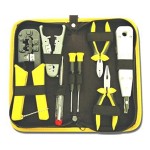
You might need professional shears to ensure a quick, clean, and accurate cut.  Each job requires cutting of cables and trimming of excess wires.  A premium cable stripper guarantees immediate and hassle-free elimination of exterior insulation from multi-core cables, unshielded twisted as well as shielded twisted pairs. The flexible depth gauge will give better results.  Refrain from using pocket knives or ordinary scissors because you will probably end up damaging the cable. Other functional tools for cable installation are can wrenches for demarcation point boxes; crimping pliers; knives for splicing cables; voltage detectors; modular plug crimpers for telephones; and, probe picks to detect loose or broken connections.


But if you prefer to have a profession all do it all for you, contact us!

structured cabling, Data Cabling ,Cat5e, Cat6/6a Cabling

Powerful Networks in Structured Cabling

16 May 2015

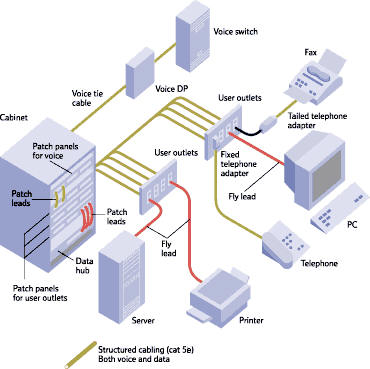
structured cabling, Data Cabling ,Cat5e, Cat6/6a CablingIt is known that structured cabling systems are fabricated to guarantee that information flows efficiently through the network. Such system are made up of transmission products installed based on appropriate guidelines in engineering design. These enable users to put into operation voice and data systems that capitalizes on speed.


This particular configuration has emerged as shared platform for multiple information technology applications. These include voice and data, building automation, security mechanisms, telecommunications conferencing, and fire alarms. This union transformed the structured cabling platform into the most essential network element. Therefore, it calls for a crucial investment in a very reliable, adaptable and scalable cabling structure.


High-performance Networks


This efficient and complex cabling scheme segregates the whole infrastructure into controllable blocks. After that, it puts them together to come up with a high-performance network. This end product is the vital link for many enterprises and all data hubs. Such a system facilitates consistency across the network particularly for commercial building structures. Consistency generates cost-effectiveness by standardizing maintenance processes, cutting down on manpower requirements, and improving reliability.


The “structured” design makes possible easy management by identifying specific distribution points, regular labeling and color codes, cabling management, and distribution techniques. As a rule, data facility managers use dynamic methodologies to fill the center with information technology equipment. This accommodates the evolving needs of business operations which frequently compel the need for the most modern IT equipment. Since companies rely on equipment as well as infrastructure, management believes requirements for additional IT capability should be made promptly. If the infrastructure is below par, upgrades will be much more difficult.


Crucial Concerns


The best IT specialists see to it that problems in structured cabling systems are dealt with immediately. One of the primary concerns is to employ highly competent service providers and coordinate entry points/space for each provider. This procedure enhances flaw tolerance of the overall system design. The high-performance model supports aggregate telecommunications requirements and thereby leads to a maximum returns on investments.


Centralized Intermediate Distribution Frames (IDFs) should be in centralized locations in the office facility. This will produce efficient cable management and will ease the addition of new equipment. This design technique has been adopted to avoid any disruption of the data unit or minimized once changes or upgrades are implemented. Telecommunications rooms contain the IDFs, main distribution frames and entrance facilities. Switches are installed in the middle of server rows for economical management.


Please contact us if you have any questions or concerns about your office network cabling.

structured cabling, Data Cabling, cabling tester

Facts about Data Cable Testing

6 May 2015

structured cabling, Data Cabling, cabling testerTesting always plays a vital role in the process of installing new cables or servicing existing ones. Regular testers for data cabling include length, wire crimper map, attenuation, return loss, and DC loop resistance.


Complex Cabling Needs


Cabling infrastructure requirements have become more complicated. More standards are being developed for cabling professionals in testing and troubleshooting copper and fiber cables. And there are special requirements as well as downsides in the implementation of new  technologies. From 10BASE-T to 100BASE-TX to 1000BASE-T and now to 10GBASE-T. It is now more crucial to keep in step with the most up-to-date techniques in cable testing too. In short, cable testing infuses a higher degree of assurance that installed cable links will attain the preferred transmission capacity for your data communications.


Cabling Tester Categories


Cable testing instruments have been manufactured with unique features for specific tasks. Costs, performance, and applications vary. These depend on the required functions. The three main functions are certification, qualification and verification. Although certain attributes overlap, each category answers a particular testing prerequisite.


Certification facilitates conformity to standards defines by the industry. These are instruments signal a “Pass” or “Fail” towards data testing compliance within standardized industry norms. These testing instruments will find out whether a cable link conforms to a category or class such as Cat6 or Cat5e. It is the last step required by most structured cabling installers towards approval of a new  installation.


Qualification determines if the existing cable is capable of supporting specific network speeds. This special class of testers is supposed to meet the up-and-coming requirements of network technicians who troubleshoot data networks. These testers perform checks to make a decision on whether a present cable link supports the requirements for fast or gigabit Ethernet. With these instruments, network technicians can identify and isolate cabling issues. While Continuity testers do not perform the series of tests set down by these standards and are not  considered certification tools.


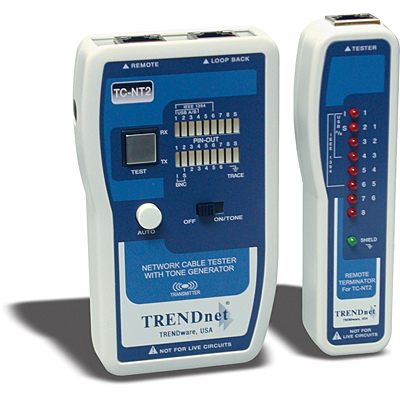
Verification makes sure that cabling connections are correct. This type of tool performs a continuity test. It guarantees all wires in the cabling link have been attached properly to termination points at each end. For twisted pair cabling, there is an appropriate pairing of the wires. Such testing tools also confirm wire pairing and find out installation flaws such as split pairs. These can also help in troubleshooting by working with a toner to pinpoint a certain cabling link. These testing tools do not give out any information regarding bandwidth and data integrity.


If you need your cabling tested or certified, contact us!

Is it Practical to Use Cat6 Cable?

26 Apr 2015

cat 6,structured cabling, Data CablingData volume has grown extensively. Also, the processing capacity to users continues to get grow. Specialists in data management forecast that information production will be 44 times larger in five years with enterprises needing to process and safeguard 80 percent of the new data.


Data Cables


For these reasons, you might need to become more familiar with different types of cabling. There is Category 5 (Cat5) cable but it is only capable of transmitting 1000 megabits data rate per second on an Ethernet network. Transfer of data demands are increasing due to new and more sophisticated applications. That is why many companies prefer to work with Category 6 (Cat6) cables. Cat6 has a maximum data transfer of 10,000 megabits per second. Cat6 is also backward compatible which means your Cat5 connectors will plug i and work (at the lower speeds).


Future Proofing


Cat6 infrastructure guarantees that your system will be relevant well into the future. This allows users to easily cope with any modifications, new features or technological developments. The Cat5 standard has been used for a long time. However, your enterprise needs adequate bandwidth to handle these continuing and future changes. It is not merely a possibility or “let's say” situation. It is to be anticipated as the online experience continues to progress.


Demand for Cat6 escalates as the world-wide web is now offering premium video streams, online applications, highly-responsive and media-heavy portals.  If you decide to upgrade to a more reliable network, consider Cat6 cables. It is fast becoming the new standard in this industry.


Downsides


Cat 6 is more costly compared to Cat5e cables. On average, we are finding that projects cost about 20-25% more. This is because you are not guaranteed full speed unless all the components operate at gigabit speed. So, you need Cat6 cable, connectors, patch panels and Gigabit switches too. If one part is not rated as gigabit, the network will run at Cat5e speeds. Call or contact us to help you make this decision.


Nevertheless, experts say Cat6 will sooner or later surpass Category 5e.  And the initial upfront costs will pay future productivity gains for many, many years to come.

 
Data Cabling, Fiber optic cable

Fiber Optic Cabling for PC Networks

17 Apr 2015

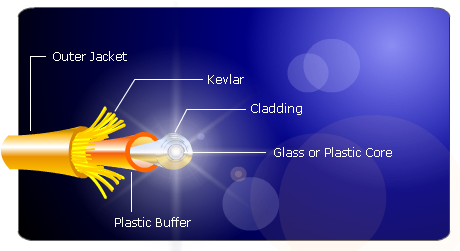
 Data Cabling, Fiber optic cableIt is not easy to install fiber optic cables for computer networks. Fiber optic cabling components consist of the core, buffer, cladding, and jacket. Some cables also have copper conductors to provide power for repeaters. Nonetheless, installation should only be performed by experts. The first step is to determine the cable that you want to use. The second is to learn the procedures of fiber optic cable installation.


Varieties of Fiber Optic Cables


Multi-mode fiber optic cable is meant for short distances or a maximum of 1,800 feet. It can transfer 10 gigabits of data per second. The single-mode fiber optic cable costs more. Yet, it has the capacity to convey the same 10 gigabits up to 37 miles. The first option is recommended for residences and small offices since there is really no need to cover such long distances.


How do you begin an installation? Prepare the switches and devices for the office PCs as well as at the faceplate for your future fiber solution. Connect the computer cable to the outlet and hubs/routers to the desktop. Attach a fiber optic cable to the router and hook it up to the second computer (if there is one). The cable must not be too tight so you can unplug it without difficulty. Secure the cables properly. Rather than replacing the existing 10BaseT network card. Leave it installed and install a new separate fiber network adapter. That will help make the transition is smoother.


You will need a media converter for devices without fiber optic outlets. It transforms light pulses into low voltage data. Plug the computer into the network using a Universal Serial Bus (USB) adapter and an Ethernet cable. Connect the workstation without the fiber optic outlet into your converter. Now, you can turn on all apparatus linked to the network.


Upkeep Techniques


Minimal maintenance is required for household networks. Simply make sure that cables are not damaged or disconnected. Cables should be bundled neatly to prevent damage. Keep these out of the reach of youngsters and pets. Puppies love to chew cables! Fiber optic cable speeds can be degraded by dust, scratches and humidity. Try to buy a cheap laser pointer to check if your cables are functioning efficiently. Position the laser at one edge of the cable and find out if the other point lights up. If it lights, the cable conducts light well. Otherwise, it is time to clean or replace the fiber optic cable. Also check your outdoor cables often since they are more susceptible to damage.


Fiber optics provide much higher speed and clear data signals compared to conventional copper cabling. Indeed, fiber optics is a terrific solution if you need more speed to your Server or for your Internet apps. And even though the cost is quite high, you are assured of a high value for your investment.

Data Cabling ,Network cabling, DC

Essential Components for Wired Networks

10 Apr 2015

Data Cabling ,Network cabling, DCBe sure to purchase the correct components before you install a wired network. The major components consist of the cable, router and network adapters.


Cables


You should opt for fast Ethernet or the 100 Base T cable. Ethernet (RJ-45) looks like telephone cables with somewhat thicker wire and jacks. It is also known as Cat 5e or Twisted Pair Ethernet with corresponding speed ratings of 10, 100, and 1,000. Every PC requires a separate network adapter.

Read More

networ cabling,cable management

Things to Avoid in Running Network Cabling

28 Mar 2015

Date cabling,cable managementWhat can cabling that has not been installed properly do?


It can lead to a lot of negative outcomes such as paralyzed network performance, maintenance troubles and hidden costs. Network cabling can be  especially troublesome if it is installed by individuals without the proper knowledge and tools. When it comes to twisted pair cabling, there are many factors that you need to consider.


In the past, many companies installed different cable systems since twisted pair cabling was expensive. At present, full installation is still costly although a greater part of the expense is labor since raw cables is not pricey. Cable management is another concern. Use of ladder racks means additional cost but it reduces upkeep. Also be sure you label cables and to make use of color codes.


Unshielded twisted pairs are more practical in terms of usage. Magnetic fields are produced by low voltages that pass through your cables. This is a vital property of the communications cycle. And if you run unshielded cables along with electrical wires, the magnetic field can be interrupted. The communications becomes corrupted or noisy. You can expect that transmissions will not make it from one point to the other. Another possibility is that transmission rates will become slower. The cables should be perpendicular with electrical lines instead with the electric wires inside of shielded tubes at cross points.


Do not attempt to run cable alongside fixtures that create “noise”. Fluorescent lamps, motors and devices that generate electrical or magnetic interference will distort your cabling infrastructure. Install a data cable conduit that will create a buffer from these hazards. Also figure out the total distance of each cable. This is usually up to 100 meters. However, if cabling data rates reaches 10 to 40 GBPs, be attentive about distance restrictions related to the kind of cabling you plan to use. If you will run 10 GBPs for a maximum of 100 meters over twisted pair cabling, it is best to use Category 6 cabling.


Be aware of local codes.


This is important for safety concerns. In many areas, using PVC-covered cables is not allowed in air-handling spaces. When PVC burns, there is toxic emission that may prove dangerous to firefighters and other safety personnel who will try to navigate the location during emergencies. Failure to follow rules can lead to fines and forced replacement of cabling infrastructure. Contractors must be mindful of these regulatory standards.

Cat5e ,Cat6/6a Cabling,patch cables

Patch Cables and Twisted Pair Cabling

21 Mar 2015

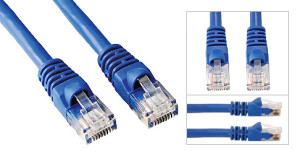
The patch cable is used to link up two network devices. This type of cabling is usually a Cat6 or a Cat5e cable thaCat5e ,Cat6/6a Cabling,patch cablest connects personal computers to the wall plate or provides the short interconnects among the switches, routers and the patch panels in the wall closet or Server Room. These make use of stranded wires instead of solid to increase flexibility. It also lessens the risk of cracking when you unplug the cable. There is also a variety of Ethernet patch called the crossover cable. It is used to hook up two PCs together and sometimes to interconnect switches.


Ethernet Systems


Ethernet systems ensure adaptable and economical methods of conveying voice, data, and multimedia over integrated networks. In fact, Ethernet patch cords have become very common. These wall to wall cables gave rise to the growth of generic and structured cabling systems. Today, these are used practically for all networking components regardless of industry or application. However, there are concerns that you need to consider. Whereas modular attributes and profusion of patch cables denote absolute universal use, there are differences that can reduce interchangeability. Some of the disparities originate from various wiring configurations of cable conductors and connector pins.


Twister Pair Cables


For this type of cabling, two conductors are coiled to prevent electromagnetic interference (commonly known as EMI) that comes from external (usually electrical) sources. One example is the electromagnetic radiation caused by uncovered twisted pair cables or UTP as well as cross talk produced by adjacent electrical wires. The process of shielding generates a conductive barrier to lessen these electromagnetic waves. It also creates a conduit for conduction so that  currents and data can traverse freely. Shielding can be applied on individual pairs or as a group of pairs.


Twisted conductor pairs form a secure circuit. The voltages carry the same magnitude or amplitude. However, one is positive while the other is negative. Incidentally, crosstalk takes place if the electromagnetic field turns out a signal that is too big or strong and intereferes with a nearby pair. The sound is like a fusion of the two fields by means of a swap of the energy between them. Certain components of these signals are passed on to each other during this exchange of energy.


As a result, here is an ensuing increase in the level of “noise”. External sources of EMI and RFI create signal interference in a similar manner. These cause distortion of the signals that go to your office and communications equipment.


Overall, these are the things that you should take into account with regards to twisted and patch cabling.


Please feel free to contact us if you need help with your office cabling project!

Network Cabling Data Cabling Cat5e Cat6/6a Cabling

Cabling Tips for Security Cameras

11 Nov 2023

CablingNetwork Cabling, Data Cabling, Cat5e, Cat6/6a Cabling,security system is definitely not the showy part of any security system. Nevertheless, it is an essential component of the system. It may seem complicated. There are many considerations in choosing and installing cables to ensure that the security system functions properly. Cables basically provide power for camera installation and transmit signals going back to the digital video recorder (DVR).


Deciding on the Perfect Cabling


Find out whether the system is analog (alternating current frequency has been modified) or digital (electronic technology). Then, you can figure out the proper cable for installation of your security cameras. Or simply refer to the manufacturing specs on the camera system.


The second step is to determine if your camera is powered remotely or connected to a nearby power outlet. It may be necessary to combine power and video cables. Security power and video cables can run next to each other or within one cable jacket. This makes installation easier by pulling one instead of two separate wires.


Make sure to test the cable before you install the CCTV. Examine each cable at the DVR position just to make sure that the cables are working prior to installation.


Cabling Guidelines


Quite often security cameras require coaxial cables to send video from the camera to your recorder. With the RG59 type of coax cable, it is possible to position the camera up to 600 feet away. The RG6 coax cable, on the other hand, may be extended up to 1,000 feet. Cut the cable according to your preferred length but leave an extra service loop of 10 – 20 feet for future flexibility.


What are the steps to follow?


  • Make the necessary BNC connection on the cable. This is a small quick round connector primarily for coaxial cables.

  • Plug one end of the BNC cable to the camera and the other to your DVR.

  • Strip the shield of the power cable to expose the black and red wires. Then, remove the jacket (at least ¼ inch) from each wire.

  • Put the wires inside the terminal block at the end of the female power wire plait. It should be red on red wires and black on black wires. Tighten screws on the terminals. Plug the camera into the fitting at the side of the braid.

  • Attach wires directly to the positive and negative leads respectively in the power box. Red wire is for positive while black is for negative. This is applicable if you will connect the camera to a multiple camera power supply unit.

  • In case you will attach the camera to a single power unit, connect the male power wire braid as well as power supply to the tip of the tress.


Now, the installation is complete and you are ready to use the system.