nework cabling,Home Cabling Solution

Choosing Between Wired and
Wireless Networking for your Home

2 Feb 2011

 nework cabling,Home Cabling SolutionMany consumers automatically choose wireless residential networking for the convenience of mobility, but there are a number of other factors that should be considered prior to making your final decision.  Things like cost, security, ease of installation and a true measure of the mobility of your home PCs should be taken into account before the important decision is ultimately made.


In terms of mobility wireless networking obviously has an advantage over a hard wired network. But how often will that mobility be required to get full, regular use out of your PCs.  If the majority of your PCs are of the desktop variety, then you

Read More

Network Cabling ,data cabling

Simplifying Your Office with Network Cabling

28 Jan 2011

Network Cabling ConfigurationInstalling network cabling in your office will result in a number of added benefits but it’s what networking will eliminate that could have the biggest impact in some environments.  The increased speed, increased performance and added security of a network are amazing attributes, but the ability to instantly share pertinent information is a feature that can truly enhance office operations.


In order to share programs or data in an environment where PCs operate independently, data needs to first be transferred to a back up medium before it could be shared with other users.  Employees would have to take the time to copy an important file or program to a CD or disk and

Read More

Home Network Cabling,data cabling

Benefits of Installing Network Cabling in Your Home

26 Jan 2011

Data Cabling,Home Network CablingMany homeowners question whether or not installing network cabling in their home is a necessity.  If you’ve got multiple computers and multiple computer users in your home, networking your PCs and equipment can have a number of advantages.


One of the single biggest advantages of installing network cabling in your home is that it gives you the ability to share equipment, data and programs between computers.  A non-networked home that has three regularly used PCs might also require three separate printers and three separate scanners.  Installing network cabling allows all three PCs to access the same printer, scanner or just about any

Read More

Network Cable Security

Make Your Business More Secure with Network Cabling

21 Jan 2011

Network Cable SecurityEvery day you gather more information that is critical to the success of your business.  Sales and customer service people compile new customer contact information, inventory is managed, quotes are generated and sales information is tallied.


Tying all of your office computer equipment together in a network gives you the opportunity to

Read More

Office Cabling, Network Cabling

Reduced Costs Through Network Cabling

19 Jan 2011

 Office Cabling ,Network CablingUpgrading to a system that allows for more users and has a higher level of performance is often viewed as something that will ultimately cost a business money.  In all reality though, beyond the initial cost of materials and installation, implementing a network cabling system that connects all of the equipment in your office can actually work to save you money.


Installing network cabling into your business environment will allow all employees to share access to a single piece of equipment as opposed to buying a separate piece of equipment for each user.  If your business requires

Read More

Office Cabling Network Cabling

Residential Network Cabling Solutions

17 Jan 2011

 Office Cabling, Network CablingHome networking is essential for quick and convenient access to music, data and video files and for the ability to share access to important pieces of equipment like scanners and printers.  A home that contains multiple PCs for personal, school and work can greatly benefit from residential network cabling.


Just because your home has fewer PCs than your office and there are fewer people using them, it doesn’t necessarily mean that your residential networking cabling will be an easier project.  Don’t assume that just because your walls don’t contain metal studs and that your floor isn’t poured concrete that your home network cabling job will be a walk in the park. 

Read More

Office Network Cabling,Cat6 Cable, Network Patch Cable

Determining Your Office Network Cabling Needs

14 Jan 2011

Office Cabling, Network CablingNetwork Patch CableA faster office is a more productive office right?  That means, because you wish your computer equipment to operate at the speed of light, that Cat6 cable is the only way to go – or is it?


Just because you are making upgrades to faster equipment office wide, it doesn’t necessarily mean that you’ll have to invest in Cat6 cable.  It’s true that Cat6 has twice the bandwidth of Cat5 and that it is far superior in performance than either Cat5 or Cat5e.  Cat6 is also capable of transferring data at a much faster rate, but in most regular office applications Cat5e is more than capable of handling the required workload.


Your new computers, internet service and office communication system may be much faster than the one that you are replacing, but that’s not the only thing to consider when selecting a networking cable.  If you aren’t transferring exceedingly large amounts of data or operating virtual PCs, Cat6 cable may be much more cable than you need and cost much more money than you need to spend.

Read More

Network cabling,Office Cabling in DC

Upgrading or Adding to Your Network – Progressive Office can Help

12 Jan 2011

Office Cabling in DCThere could be any number of reasons that your voice and data system may be changing.  You might be adding more PCs or phone lines; adding a dedicated server to store critical data or adding scanners or printers to more adequately serve customer needs.


In order to ensure a seamless transition into your larger, upgraded network there’s a very good chance that you’ll need upgrades or

Read More

Network Cabling, Data Cabling ,Cat5e ,Cat6/6a Cabling

Computer Network Patch Panel

23 Dec 2009

Network Cabling ,Data Cabling, Cat5e, Cat6/6a CablingA patch panel is an in-line series of connections mounted onto a frame to enable network cables to be terminated in an orderly manner. Typically, the panel is the termination point of network cabling drops that are installed in a office or residential cabling system.It is numbered and comes in 12-port, 24-port, 48-port and 96-port configurations. The numbering of the panel ports allows for the network installer to label the wallplates to match the corresponding connection at the patch panel.


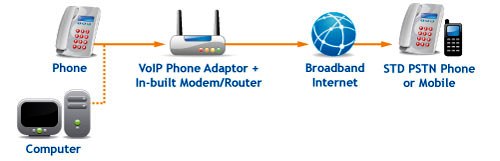
Patch panels are most commonly used for computer data networks but as Voice Over Internet Protocol (VOIP) phone systems become more common, we are seeing phone systems being terminated into panels. They are wall or rack-mounted. In small offices, a 12 or 24-port patch panel might be wall-mounted to a wooden mounting board. Larger office networks will usually require a rack mounted series of  panels.


The patch panel comes in Cat5, Cat5e and Cat6 types to match the cable being installed. The connections on the panel are RJ45 that are designed to allow for a cable to "punch-downed" into the connector. The connector has 8 punch down points to accommodate the 4-pairs of wires in a Cat5/6 cable.

Cabling Definitions

24 Sep 2009
Backbone wiring is the cabling used to interconnect between telecommunication closets, equipment rooms and buildings.

A 19-inch rack is a standardized frame or enclosure for mounting multiple equipment modules. A frame style, open rack (see image to the right) would have outer posts but no front or side panels.  An enclosed rack has sides and a door for security and usually includes ventilating fans to keep equipment cool. Enclosures are much more expensive than open racks.

Racks have a front panel that is 19 inches wide, including edges or ears that protrude on each side which allow the shelves, switches and patch panels to be fastened to the rack frame with screws.

Rack Unit or U is a unit of measure that describes the height of equipment to be mounted in a computer equipment rack.  One rack unit is 1.75 inches (44.45 mm) high. The size of rack-mounted equipment is described as a number in "U". For example, one rack unit is referred to as "1U", 2 rack units as "2U" and so on. A typical full size rack is 42U, which means it holds just over 6 feet of equipment.

wallplate-cat5

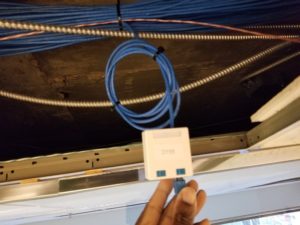
Wall Plates are the metal or plastic covers that house the network connection jack. Wall plates are flush-mounted on office and residential drywal surfaces.

RJ45 Connector is the modular connector that is found at the end of a network cable. It is similar in look functionality to a phone connection cat5cablebut it is larger in size and it has 4-pairs of wires rather than the 2-pairs that are found in a phone line.

Jacks and Inserts are the actual connection at the wallplate. They are often color coded to distinguish the different connections such as voice and data.

Patch Panel is a series of 24, 48 or 96 RJ45 network connectors on a patchPanelcat5-insertpanel. The patch panel is the hub of all incoming workstation network connections.

Patch Cable is a network cable with RJ45 connectors at each end that create the connection from the wallplate to the computer and also from the patch panel to the switch.

Horizontal wiring encompasses all cable from a wallplate network connection to the wiring closet. The outlets, cable, and cross-connects in the closet are all part of the horizontal wiring.

Wiring closet is an enclosed area, such as a room or cabinet, for containing network, telecommunications equipment, and cable terminations. Each building must have at least one wiring closet.patch cable

Equipment room is the space that houses the office network and telecommunications systems such as PBXs, racks, servers, and the mechanical terminations of the cabling system. Larger facilities often have Equipment Rooms rather than Wiring Closets.

Cabling administration is a process that includes all aspects of premise wiring related to documenting and managing the system, testing the system, as well as the architectural plans for the system.


Click here to go to a page that will put you in touch with us. Answer all of the questions that you can and we will get back to you with a quote.