Data Cabling Cat5e Cat6/6a Cabling

Should you upgrade your Cat5 cable to Cat6 or Cat6a?

23 Mar 2014
cable tester ,Data Cabling, Cat5e ,Cat6/6a CablingA business decision is approaching. Most companies have Cat5/5e cable in their offices. And it has served well in providing reliable data access to servers, peripherals and the Internet. Cat5/5e runs at speeds up to 1gb (also known as 1000Base-T). Cat6 runs at 10gb but has sorter runs. Whereas Cat5 can have cable lengths of up to 100m, Cat6 maxes out at 55m. This number falls to 37m in a hostile environment.  To achieve full 100m cable lengths maximum while minimizing the risks of crosstalk, it is advisable to install Cat6a cable.

Ultimately, this decision is about costs vs. gains. And before a decision can be made, it is critically important to determine if your existing cable infrastructure is running into bottlenecks that cause traffic slowdowns at the desktop for your users. Internet might only needs about 5 - 25mb of bandwidth. But if your office has a lot of workstations and/or a group of users that are utilizing data-intensive publishing or graphic applications, you might need more speed. We have sophisticated network monitoring tools that can determine the traffic across your network. If we determine that you are using all available bandwidth, than your decision will be based on solid information.

Cat6 and Cat6a will boost your network speeds to 10gb/sec. Can you afford to upgrade to Cat6/6a? If the costs justify the expense, please contact us. We will send out one of our top network cabling technicians to analyze your network and determine if this upgrade option is a good idea for your office. And if it is, we will follow up with a proposal all at no cost to your firm.

 
Data Cabling Cat5e Cat6/6a Cabling

Abandoned Cable Liability Issue

17 Oct 2013
 Cabling,Data Cabling Cat5e Cat6/6a Cabling

As tenants come and go in a commercial building, the cabling infrastructure sometimes leaves behind abandoned Cat5, Cat6 and coax cabling. All that needs to happen is for the new tenant to request a reconfigured layout that relocates the main wall closet. Or, sometimes the old tenant will cut away the cabling in order to take the patch panels with them. If possible, keep the wall closet location. And always offer to buy the patch panels from a departing tenant.


Read More

network cabling, data cabling

Perfect Patch Panel Installation

4 Jun 2013
This project involved installation of 28 double drops into two 48-port patch panels. Each wall plate has two connections with one dedicated to data and the other dedicated to voice. Price Benowitz has a lovely office at 409 7th Street, NW. The building is historic but renovated into a modern office. So, the drop ceilings and hollow walls facilitated a straight-forward installation of the Cat5e network cabling system.
Read More
Network Cabling,data cabling,,DC

Cabling Issues

11 Apr 2013

data cabling,,DCOne of the most important things about cabling is to purchase cable not just for what you’re using now but for what you may run in the future.   A rule of thumb is to install the highest-grade cable that your budget allows.
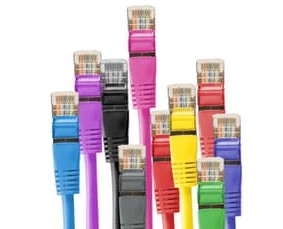

The standard is Ethernet. That means there are two basic types of cables to use: copper Ethernet and fiber optic Ethernet. Copper Ethernet cabling is generally used to connect the data center equipment to the end-user, while fiber optic cabling is used to network the infrastructure and to

Read More

IT Support,Data Cabling,Atlanta GA

A Guide to Network Cabling

22 Mar 2013

Cat 6While WI-Fi and other wireless network technologies have improved greatly over the years, nothing beats the reliability and performance of a wired network in your home or business. One challenge that people face is what kind of cable they need for their needs.


Although there are dozens of network cable types, the fact is only 3 types of network cable is commonly used in home and small business networks: Category 3 (Cat3), Category 5 (Cat5), and Category 6 (Cat6).

Read More

Data Cabling, Cat5e Cat6/6a Cabling, Washington DC

Cat6 Q&A

4 Feb 2013

Data Cabling ,Cat5e ,Cat6/6a CablingWhat is Cat6? Cat6 components are interoperable between different vendors and are fully backward compatible. Cat6 has the same nominal Impedance of 100 Ohms as Cat5 and 5e components, but with tighter tolerance on Impedance variations. Transmission parameters are specified to 250 MHz, compared to 100 MHz for Cat 5/5e.


Do Cat6 components behave differently?   The diameters of Cat6 cables range between 0.21 to 0.25 inch (5.3 - 5.8 mm) compared to Cat5/5e’s range of 0.19 to 0.22 inch (4.8 – 5.5 mm).   Cat6 also has a tighter twist length to reduce crosstalk interference.


What about installation?  Cat6 cables and components are installed similar to Cat5/5e. There are design and installation issues that contractors and installers must pay greater attention to; including cable terminations and the pathway fill.


Will Cat6 supersede Cat5/5e?  Yes. The only question is when. The installed cost for Cat6 cabling can be about 20 % higher than Cat5e, but prices will decrease as usage increases.


Will Cat6 deliver what is promised?  Yes. There are no technical obstacles. Test parameters and procedures to qualify Cat6 components to ensure interoperability between different vendor’s products are in place and detailed.


What about the installed performance compared with Cat5/5e?  The biggest benefit is much-improved Signal-to-Noise Ratio at the Receiver:  Cat6 provides about 16 times better Signal-to-Noise Ratio compared to Cat5/5e over a wide frequency range.


Why do we need Cat6? The real question is “is Cat5e good enough for today and in the foreseeable future?”  The answer is “Yes, but…”. Network switch ports are often at the “marginally compliant” limits of the IEEE standard and susceptible to cabling and temperature variations. Cat6 provides fewer bit errors than Category 5e for 100BASE-TX and 1000BASE-T applications.

Cabling, Installations, Network Cabling

Cat6 Installation Tips

9 Jan 2013
 Data Cabling, Cat5e Cat6/6a CablingAlways study and document the required cabling layout and the distances between the equipment to be cabled before starting a Cat6 cable installation.

Refer to ANSI/TIA/ EIA 606 Document for color coding the different functions used in the system guidance. Use either PVC or plenum cable as required depending on where the cables are run. Fiber optic and/or copper cable may be required depending on the transmission speed and type of equipment.
Read More
Network Cabling,data cabling,,DC

Network Cabling Issues

4 Jan 2013

Cat5 ,Cat6 ,lan cableGiven that labor costs for installation are much higher than the material cost for cable; your first requirement is to use the highest grade cable available. Cat5e is the most common, but Cat6 is becoming the standard as it is rated for a higher frequency signal, a somewhat higher cable quality, and has tighter specifications for noise and crosstalk. Both Cat5e  and Cat6 can handle gigabit speeds.


Both Cat5e and Cat6 use 10BaseT “twisted-pair” cabling, because it is ideal for either small, medium, or large networks that need flexibility and the capacity to expand as the number of network users grow.  In a twisted-pair network, each PC has a twisted-pair cable that runs to a centralized hub. Twisted-pair is generally more reliable than thin coax networks because the hub is capable of correcting data errors and improving the network's overall transmission speed and reliability. Also known as “up linking” hubs, they can be chained together for even greater expansion.


Should you install the cabling yourself, or hire a contractor? The smaller the office network, the more tempting it is to install cabling in-house. While this will save installation costs, it is important to be sure that all the cabling is installed and tested to professional standards. If your network encompasses multiple rooms-and/or floors, then hiring a professional cable installer that has experience with data communications networks is the safest and most practical route.  General electricians may not be familiar with all the requirements. Experienced cable installers such as Progressive Cabling will know the right grades of cables and connectors and have the knowledge and equipment to install and test a cabling system.

Cabling Network Cable Twisted Pairs

Cat5, 6 and 7 – What the Numbers Mean

2 Jan 2013

Category 6 Network Cable Twisted PairsCategory (Cat)5, 5e, 6 and 7 are different standards for cables used to transmit data through networks. All are twisted copper cables. The difference is based on their performance level.


Cat5 has become the world standard for connecting Ethernet devices. It is inexpensive and very effective; making it the most commonly used cable for connecting Ethernet devices. There are  two types, the Unshielded Twisted Pair (UTP), and the Screened Twisted Pair (SCTP).  SCTP adds a protective covering to protect against interference.  Cat5 is ideal For long distance communications as it is rigid and has the capacity to support 10-100 Mbps and 100MHz.
The gradual shift from standard 10/100 networks to gigabit networks has challenged Cat5 as it  cannot support high speeds. This led to an upgraded version, Cat5e.


Cat5e was developed to makeCat5 compatible with gigabit networks and provide extra protection from interference. However Cat5e does not completely remove interference, which results in slow and often poor performance, but Cat5e does makes networks more reliable and faster.

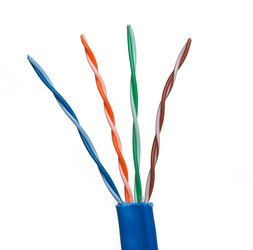
Cat6 is more advanced than Cat5 and Cat5e.  Like Cat 5 and 5e, it uses 4 twisted pairs of copper cables, but with much better performance. The difference comes from a longitudinal separator that keeps all 4 wires separate from one another, reducing interference or “cross talk”, and a faster rate of data transfer.  Cat6 can be used in any network that employed Cat5 and Cat5e. Cat 6 is the next level standard for Ethernet connection.

Cat7 is the next generation cabling device for Ethernet connections. It improves internal signaling and exterior protection over Cat5 and Cat6 and can support 10gigabit connections  adaptable to standard Ethernet connectors.

International Cooperating Ministries – Cabling Project Notes

20 Aug 2012

Project Objectives and Details based on site survey by Richard Elbe


Number of Drops: 110 total cable drops

  • 47 double network drops

  • 1 single network drop

  • 3 network printer drops

  • 3 media box wallplates with (2 HDMI, 2 VGA and 3 RCA Jacks)


Ceiling: Non-plenum, separate ducting allows for Cat6 PVC cable rather than the more expensive plenum cable.

Racks: 6' x 19" Relay Rack

Switches: Five 24,port Netgear Gigabit switches that will leave room for 4 ports per switch for future expansion of the network.
Read More