Network Infrastructure Planning
What is a network?
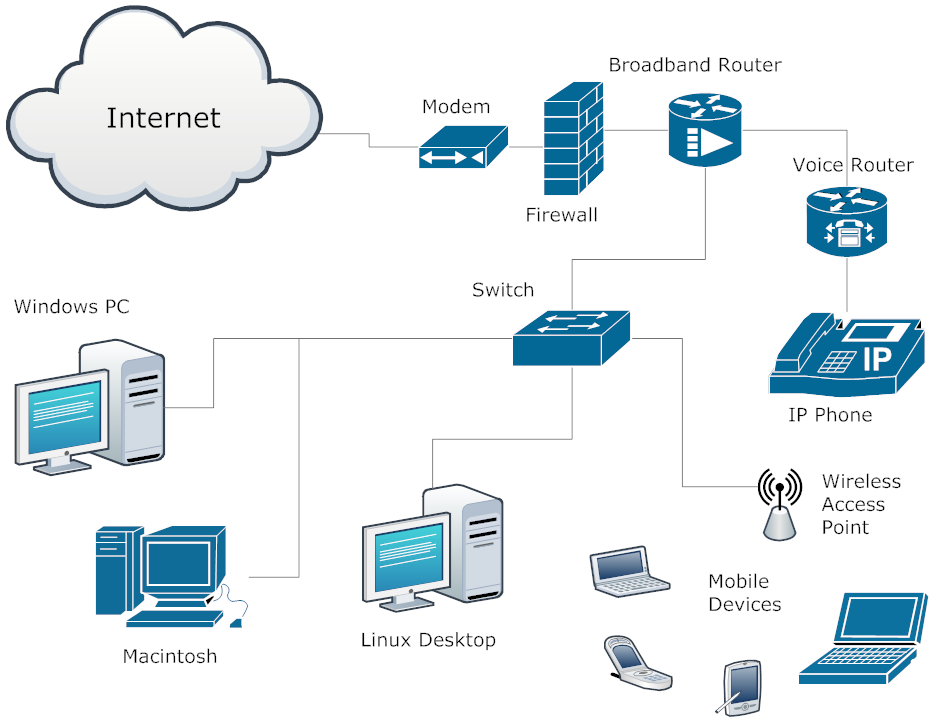
The network is classified as a group of hardware and software components that connect devices within a company and link that entity to other companies in the world-wide web. The hardware for networking consists of network interface cards, computers, routers, switches, patch panels and cables. Software refers to network services and protocols that facilitate communications. The hardware components should be installed and configured before the software and operating systems are initiated. Network communications serve as the core foundation of the whole system. It makes up the services that build the network’s framework. The key is to determine the infrastructure based on the objectives that you have set so the architecture can scale up as a companies needs grow.
The Operating Systems
Begin by understanding the current setup. This will allow you to establish how to plan for your operational targets and objectives. Draw a full map of the current network. Include these all cabled connections, server information, location of devices in the network, and all of the users. Complete this inventory first. Then, proceed with reviewing all available information in combination with the future goals. This will enable you to fully understand the required changes needed for deployment.
The operating systems or OS installed on computers make up the primary software components in a cabling infrastructure. The OS contains protocols that facilitate network communications. It also consists of applications and services that secure the data. Conventional features include connectivity, security, control of access, and routing/switching functions. There should an existing network before installing servers to support applications. These consist of file, print, web, messaging, application, and database servers.
Meticulous Planning
- Document the physical hardware and software components
- Decide on the actual location of each components.
- Determine configuration requirements.
- Buy, assemble and mount the hardware.
- Install and configure your OS, apps as well as other software.
Be sure to understand the network’s physical design. If there are multiple heavy or data intensive workloads, servers will need more bandwidth and connections to deal with the data traffic. Network resources need to allocated among the numerous applications which mean that vital applications can affect performance considerably. Planning becomes an integral component of development and should be specific to the business plans.
Keep track of existing workloads and use performance results as a reference. There should be proper tests to determine the performance of your network. Speculation is not advisable because that can cause mistakes and overspending.
As always, Progressive Office is available to assist with project planning. Please call or email us anytime.

 I thought I would throw out my two cents on the release of Windows 7. It is tomorrow, October 22. I have been working with it for the past few months and think that it is 90% better overall than Windows Vista. I will not go into the myriad of reasons except to say that it is considerably more compatible with XP and some of the older applications and peripherals than Vista was. Microsoft went so far as to design a copy of Windows XP into Vista so that you can literally run XP inside your Win7 computer simultaneously just in case you have a very antiquated application that absolutely, positively will not work on anything
  except XP (also for those that are afraid to commit to a newer operating system).

 Would you consider using the cell phone you had in 2000? Think about it. Back in 2000, the early models of the Treo were hot products and by today standards they are very inadequate.