Data Cabling Cat5e Cat6/6a Cabling

Should you upgrade your Cat5 cable to Cat6 or Cat6a?

23 Mar 2014
cable tester ,Data Cabling, Cat5e ,Cat6/6a CablingA business decision is approaching. Most companies have Cat5/5e cable in their offices. And it has served well in providing reliable data access to servers, peripherals and the Internet. Cat5/5e runs at speeds up to 1gb (also known as 1000Base-T). Cat6 runs at 10gb but has sorter runs. Whereas Cat5 can have cable lengths of up to 100m, Cat6 maxes out at 55m. This number falls to 37m in a hostile environment.  To achieve full 100m cable lengths maximum while minimizing the risks of crosstalk, it is advisable to install Cat6a cable.

Ultimately, this decision is about costs vs. gains. And before a decision can be made, it is critically important to determine if your existing cable infrastructure is running into bottlenecks that cause traffic slowdowns at the desktop for your users. Internet might only needs about 5 - 25mb of bandwidth. But if your office has a lot of workstations and/or a group of users that are utilizing data-intensive publishing or graphic applications, you might need more speed. We have sophisticated network monitoring tools that can determine the traffic across your network. If we determine that you are using all available bandwidth, than your decision will be based on solid information.

Cat6 and Cat6a will boost your network speeds to 10gb/sec. Can you afford to upgrade to Cat6/6a? If the costs justify the expense, please contact us. We will send out one of our top network cabling technicians to analyze your network and determine if this upgrade option is a good idea for your office. And if it is, we will follow up with a proposal all at no cost to your firm.

 
,Cat5e ,Cat6/6a Cabling, RackOld Ratary Phone

Microsoft is Ma Bell

12 Jan 2014

Remember the 60s? I do. We had a rotary phone and it made phone calls. Our number was Whitehall 6-4990. And it was an amazing device that allowed us to talk to our friends and family by simply spinning the dial for each number and waiting for someone to pick up the phone on the other end. Back then, Ma Bell had a monopoly and most people probably thought that was fine. Phone service was reliable. The technology seemed like a blessing. The service was affordable although long-distance calls were very, very expensive.

Read More

network cabling, data cabling

Perfect Patch Panel Installation

4 Jun 2013
This project involved installation of 28 double drops into two 48-port patch panels. Each wall plate has two connections with one dedicated to data and the other dedicated to voice. Price Benowitz has a lovely office at 409 7th Street, NW. The building is historic but renovated into a modern office. So, the drop ceilings and hollow walls facilitated a straight-forward installation of the Cat5e network cabling system.
Read More
Network Cabling,data cabling,,DC

Cabling Issues

11 Apr 2013

data cabling,,DCOne of the most important things about cabling is to purchase cable not just for what you’re using now but for what you may run in the future.   A rule of thumb is to install the highest-grade cable that your budget allows.


The standard is Ethernet. That means there are two basic types of cables to use: copper Ethernet and fiber optic Ethernet. Copper Ethernet cabling is generally used to connect the data center equipment to the end-user, while fiber optic cabling is used to network the infrastructure and to

Read More

Network Cabling, Data Cabling ,Cat5e, Cat6/6a Cabling

Basic Structured Cabling

4 Apr 2013
Cables,Network Cabling, Data Cabling, Cat5e ,Cat6/6a Cabling

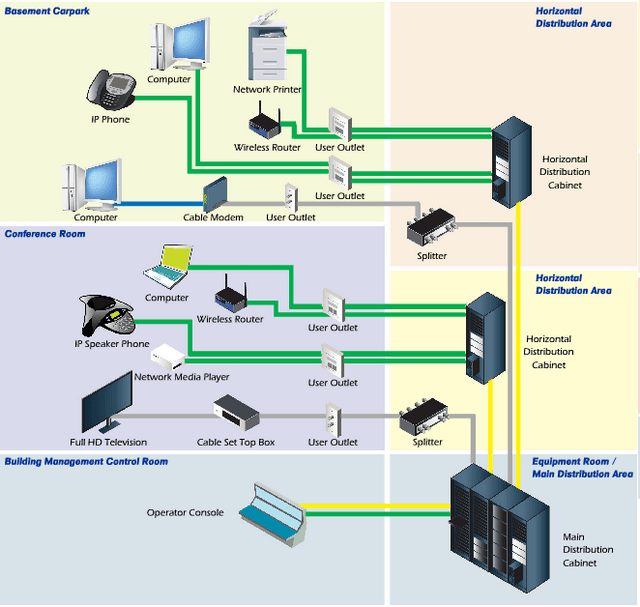
"Structured cabling” is a complete system of cabling and associated hardware which creates a telecommunications infrastructure. This infrastructure can serve a range of tasks, such as providing telephone service or data transmission through a computer network.

Every cabling system is unique. Variations in the structure of the facilities housing the installation, the specific cabling and connections needs, use and function, as well as customer needs requires standardization to ensure acceptable system performance from increasingly complex systems. The American National Standards Institute (ANSI) is the responsible organization
Read More
IT Support,Data Cabling,Atlanta GA

A Guide to Network Cabling

22 Mar 2013

Cat 6While WI-Fi and other wireless network technologies have improved greatly over the years, nothing beats the reliability and performance of a wired network in your home or business. One challenge that people face is what kind of cable they need for their needs.


Although there are dozens of network cable types, the fact is only 3 types of network cable is commonly used in home and small business networks: Category 3 (Cat3), Category 5 (Cat5), and Category 6 (Cat6).

Read More

Structured-Cabling,Data Cabling

What is “Structured Cabling”?

14 Mar 2013

Structured-CablingStructured cabling is a telecommunications cabling infrastructure consisting of a number of standardized smaller elements called subsystems.


Structured cabling falls into five subsystems:

  1. A Demarcation point is the connection point where the telephone company network ends and the customer’s on-premise wiring connection begins.

  2. Equipment or Telecommunications Rooms contain equipment and wiring points that serve the users inside a building.

  3. Vertical or Riser Cabling connects between the equipment/telecommunications rooms on different floors.
    Read More
Network cabling,Office Cabling in DC

Ethernet Wiring for Home Networking

1 Mar 2013

Network cabling,Office Cabling in DCAlthough “Wifi" is simpler for a lot of people, due to multimedia sharing, bandwidth on some  home networks, some users  really want a hard-wired home networking solution. A wired network allows a private, high speed, network at home for Internet access, file sharing, media streaming, online gaming (console or PC), IP security cameras, or other standard Ethernet type wiring use.


There are certain design considerations that need to be addressed based on needs.  Answering these questions will affect quantities, tools and materials needed.


The basic questions are:


  1. Which room(s) do I want wired?

  2. How many ports do I want in each location?

  3. What is a good location for distribution?

    If the internet comes over a cable into the house move the cable modem there so  it will be able to supply internet access to the entire network.  Another consideration is the amount of space needed to hold the network equipment.


  4. What path should the cables take?

    This is the most difficult consideration. For single floor homes the basement may be the best path. For multi-story homes you have to be creative. Outside may be an option or use an old laundry chute. The other consideration is cable length. The max cable length for up to gigabit speeds over copper UTP cabling is 100 meters (300 feet). This should be plenty for most home applications.


  5. What network speed do I need?

    This will determine what kind of switch to get. 10mbps is faster than most home internet connection.  If you just “surf” the internet, use a 10 megabit switch. If you are planning on sharing multimedia over the network 100 megabit switches are available and reasonably priced. If you must have the fastest, go with a Cat6 Gigabit cable.


Data Cabling, Cat5e Cat6/6a Cabling, Washington DC

Cat6 Q&A

4 Feb 2013

Data Cabling ,Cat5e ,Cat6/6a CablingWhat is Cat6? Cat6 components are interoperable between different vendors and are fully backward compatible. Cat6 has the same nominal Impedance of 100 Ohms as Cat5 and 5e components, but with tighter tolerance on Impedance variations. Transmission parameters are specified to 250 MHz, compared to 100 MHz for Cat 5/5e.


Do Cat6 components behave differently?   The diameters of Cat6 cables range between 0.21 to 0.25 inch (5.3 - 5.8 mm) compared to Cat5/5e’s range of 0.19 to 0.22 inch (4.8 – 5.5 mm).   Cat6 also has a tighter twist length to reduce crosstalk interference.


What about installation?  Cat6 cables and components are installed similar to Cat5/5e. There are design and installation issues that contractors and installers must pay greater attention to; including cable terminations and the pathway fill.


Will Cat6 supersede Cat5/5e?  Yes. The only question is when. The installed cost for Cat6 cabling can be about 20 % higher than Cat5e, but prices will decrease as usage increases.


Will Cat6 deliver what is promised?  Yes. There are no technical obstacles. Test parameters and procedures to qualify Cat6 components to ensure interoperability between different vendor’s products are in place and detailed.


What about the installed performance compared with Cat5/5e?  The biggest benefit is much-improved Signal-to-Noise Ratio at the Receiver:  Cat6 provides about 16 times better Signal-to-Noise Ratio compared to Cat5/5e over a wide frequency range.


Why do we need Cat6? The real question is “is Cat5e good enough for today and in the foreseeable future?”  The answer is “Yes, but…”. Network switch ports are often at the “marginally compliant” limits of the IEEE standard and susceptible to cabling and temperature variations. Cat6 provides fewer bit errors than Category 5e for 100BASE-TX and 1000BASE-T applications.

Cat5 Cat6 Network Cabling,Washington DC

The Good, the Bad, and the Ugly: Cabling Lessons Learned

14 Dec 2012

Cat5, Cat6 data cables ,connected to serversA magnetic field when running low voltages. Unfortunately, when this unshielded cabling creates a magnetic field created. Any electrical cabling bear by disrupts communication, slowing transmission or preventing Network cabling is a tricky. Even with a solid background, technicians without adequate knowledge and training can make mistakes that may shut down an entire system. Here are some typical mistakes seen in network cabling.


Plan for the Future.  Cat5 may be the cheaper option, but can cause problems when upgrading is needed. Install Cat5e or Cat6 cables with options for upgrades to save labor costs.


Don’t Mix and Match. Twisted pair cabling was often out of the price range for many companies, so priority was given to data, while voice had with cheaper cabling. Now, VoIP has made voice equal to data in importance and need. Fortunately, a typical VoIP phone has a built-in Ethernet connection or pass-thru that is compatible with almost any data cable, which decreases installation costs.


Don't put Electrical Cables Next to Data Cables. Data cables use twisted pairs of wires inside that help produce transmissions altogether. This generally happens when the cables are running parallel, so if your cable is near a power line, lay them perpendicular to the power line.


 Not Laying New Cable When You Need To. Ethernet switches are convenient, but can be misused. Mini-switches are often added to provide a few extra ports; but this can cause bottlenecks and instability. Add extra cable instead, if more network resources are needed.


Forgetting Cable Management. “Ladder racks” add extra cost to an installation, but they also make the installation look better, run better, and easier to maintain and update. Also, don't forget to color code or label your cables, so technicians can actually find the right cable later.