Network cabling, NetworkTopologies.

Essential Facts About Cabling System

14 Dec 2014

Network cabling, NetworkTopologies.Your office cabling system is costly and complicated investment. It's also a commitment to an office design and structure that is not easy to modify. If you add more workstations later, new cabling might be needed.


Most offices have a structured cabling topology that hardwires the cables from wallplate to patch panel. With this system, modifications are less likely because the initial installaiont includes a planning process that should anticipate some expansion. By pre-wiring potential locations in an existing or newly-constructed building, future moves, additions or alterations are avoided. You can just transfer patched cables in the wiring closet. Also, it is critical to number the wallplates to match the corresponding patch panel number. This will make it much easier to relocate a workstation or to troubleshoot a connectivity problem.


There are several sub-systems to consider:


  • The Demark refers to the point where the Internet Service Provider's (ISP) data line comes to an end and hooks up with the cabling in the building.

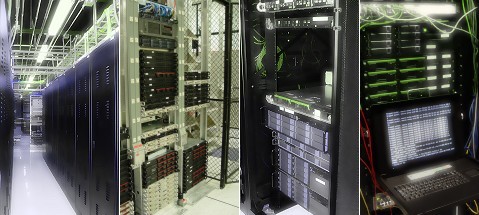
  • The equipment room serves as storage for all apparatus and wiring integration points.

  • Backbone cabling are high-speed cables (typically Cat6 or fiber) that connect various floors or wall closets.

  • The horizontal cabling for links up the network space to individual wallplates. These are done through conduits and ceiling spaces on every level.

  • The telecommunications enclosures are wall or floor mounted cages that hold the network equipment; primarily the patch panels ands switches but also sometimes the server and Uninterruptible Power Supplies (UPS) too.


Installation and design of structured cabling is regulated by standards that identify the following:


  • Network data switches

  • Offices layout for voice & data communications for Cat5e or Cat6 cable

  • Fiber Optic cables for backbones

  • Modular connectors at the wallplate


These components will guide the layout of cables in order to fulfill the data access requirements of your office. All of the cables start at the patch panel on a mounted rack (about 19 inches wide) in the wall closet. From there, they traverse through the drop ceiling and down the walls to individual wallplates. Quite often a wallplate will host 2 or more connections. At the wallplate a short patch cable, usually 7 to 14 feet in length wil connect the computer, phone, printer or other networked device.


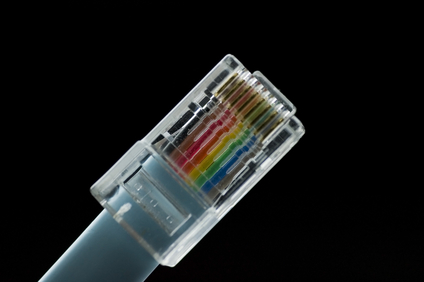
All cabling standards require that all of the eight conductors in Cat5, Cat5e and Cat6 cables are inter-connected in a precise color-coded pattern. The network cable connects each device but some devices can share a single cable. This is true for VoIP phones. Most VoIP phones have a jack for the network cable and then a jack on the phone for connecting the computer. This pass-thru enables the two devices to share one connection.

Cat5e Cat6/6a Cabling,Office Cabling

Handling Cat5/Cat5e Cabling

19 Nov 2014

cat 5e,Network cabling, cables, Atlanta GAInformation Technology specialists have to choose the kind of cable to utilize for their networks. Cat5 has been one of the main choices for decades. This is because Cat5 supports 10/100 Ethernet which includes Fast Ethernet. In recent years, Cat5e has become the dominant choice for new cabling projects. And Cat5e cable is also backwards compatible. Your computers, phone and other network devices will work on Cat5e cable.


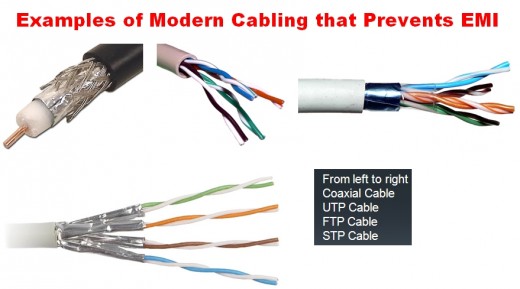
One handling issue is the electrical interference

Read More

Data Cabling Cat5e Cat6/6a Cabling

Should you upgrade your Cat5 cable to Cat6 or Cat6a?

23 Mar 2014
cable tester ,Data Cabling, Cat5e ,Cat6/6a CablingA business decision is approaching. Most companies have Cat5/5e cable in their offices. And it has served well in providing reliable data access to servers, peripherals and the Internet. Cat5/5e runs at speeds up to 1gb (also known as 1000Base-T). Cat6 runs at 10gb but has sorter runs. Whereas Cat5 can have cable lengths of up to 100m, Cat6 maxes out at 55m. This number falls to 37m in a hostile environment.  To achieve full 100m cable lengths maximum while minimizing the risks of crosstalk, it is advisable to install Cat6a cable.

Ultimately, this decision is about costs vs. gains. And before a decision can be made, it is critically important to determine if your existing cable infrastructure is running into bottlenecks that cause traffic slowdowns at the desktop for your users. Internet might only needs about 5 - 25mb of bandwidth. But if your office has a lot of workstations and/or a group of users that are utilizing data-intensive publishing or graphic applications, you might need more speed. We have sophisticated network monitoring tools that can determine the traffic across your network. If we determine that you are using all available bandwidth, than your decision will be based on solid information.

Cat6 and Cat6a will boost your network speeds to 10gb/sec. Can you afford to upgrade to Cat6/6a? If the costs justify the expense, please contact us. We will send out one of our top network cabling technicians to analyze your network and determine if this upgrade option is a good idea for your office. And if it is, we will follow up with a proposal all at no cost to your firm.

 
Data Cabling Cat5e Cat6/6a Cabling

Abandoned Cable Liability Issue

17 Oct 2013
 Cabling,Data Cabling Cat5e Cat6/6a Cabling

As tenants come and go in a commercial building, the cabling infrastructure sometimes leaves behind abandoned Cat5, Cat6 and coax cabling. All that needs to happen is for the new tenant to request a reconfigured layout that relocates the main wall closet. Or, sometimes the old tenant will cut away the cabling in order to take the patch panels with them. If possible, keep the wall closet location. And always offer to buy the patch panels from a departing tenant.


Read More

network cabling, data cabling

Perfect Patch Panel Installation

4 Jun 2013
This project involved installation of 28 double drops into two 48-port patch panels. Each wall plate has two connections with one dedicated to data and the other dedicated to voice. Price Benowitz has a lovely office at 409 7th Street, NW. The building is historic but renovated into a modern office. So, the drop ceilings and hollow walls facilitated a straight-forward installation of the Cat5e network cabling system.
Read More
Network Cabling,data cabling,,DC

Cabling Issues

11 Apr 2013

data cabling,,DCOne of the most important things about cabling is to purchase cable not just for what you’re using now but for what you may run in the future.   A rule of thumb is to install the highest-grade cable that your budget allows.


The standard is Ethernet. That means there are two basic types of cables to use: copper Ethernet and fiber optic Ethernet. Copper Ethernet cabling is generally used to connect the data center equipment to the end-user, while fiber optic cabling is used to network the infrastructure and to

Read More

IT Support,Data Cabling,Atlanta GA

A Guide to Network Cabling

22 Mar 2013

Cat 6While WI-Fi and other wireless network technologies have improved greatly over the years, nothing beats the reliability and performance of a wired network in your home or business. One challenge that people face is what kind of cable they need for their needs.


Although there are dozens of network cable types, the fact is only 3 types of network cable is commonly used in home and small business networks: Category 3 (Cat3), Category 5 (Cat5), and Category 6 (Cat6).

Read More

Data Cabling, Cat5e Cat6/6a Cabling, Washington DC

Cat6 Q&A

4 Feb 2013

Data Cabling ,Cat5e ,Cat6/6a CablingWhat is Cat6? Cat6 components are interoperable between different vendors and are fully backward compatible. Cat6 has the same nominal Impedance of 100 Ohms as Cat5 and 5e components, but with tighter tolerance on Impedance variations. Transmission parameters are specified to 250 MHz, compared to 100 MHz for Cat 5/5e.


Do Cat6 components behave differently?   The diameters of Cat6 cables range between 0.21 to 0.25 inch (5.3 - 5.8 mm) compared to Cat5/5e’s range of 0.19 to 0.22 inch (4.8 – 5.5 mm).   Cat6 also has a tighter twist length to reduce crosstalk interference.


What about installation?  Cat6 cables and components are installed similar to Cat5/5e. There are design and installation issues that contractors and installers must pay greater attention to; including cable terminations and the pathway fill.


Will Cat6 supersede Cat5/5e?  Yes. The only question is when. The installed cost for Cat6 cabling can be about 20 % higher than Cat5e, but prices will decrease as usage increases.


Will Cat6 deliver what is promised?  Yes. There are no technical obstacles. Test parameters and procedures to qualify Cat6 components to ensure interoperability between different vendor’s products are in place and detailed.


What about the installed performance compared with Cat5/5e?  The biggest benefit is much-improved Signal-to-Noise Ratio at the Receiver:  Cat6 provides about 16 times better Signal-to-Noise Ratio compared to Cat5/5e over a wide frequency range.


Why do we need Cat6? The real question is “is Cat5e good enough for today and in the foreseeable future?”  The answer is “Yes, but…”. Network switch ports are often at the “marginally compliant” limits of the IEEE standard and susceptible to cabling and temperature variations. Cat6 provides fewer bit errors than Category 5e for 100BASE-TX and 1000BASE-T applications.

Cabling, Installations, Network Cabling

Cat6 Installation Tips

9 Jan 2013
 Data Cabling, Cat5e Cat6/6a CablingAlways study and document the required cabling layout and the distances between the equipment to be cabled before starting a Cat6 cable installation.

Refer to ANSI/TIA/ EIA 606 Document for color coding the different functions used in the system guidance. Use either PVC or plenum cable as required depending on where the cables are run. Fiber optic and/or copper cable may be required depending on the transmission speed and type of equipment.
Read More
Network Cabling,data cabling,,DC

Network Cabling Issues

4 Jan 2013

Cat5 ,Cat6 ,lan cableGiven that labor costs for installation are much higher than the material cost for cable; your first requirement is to use the highest grade cable available. Cat5e is the most common, but Cat6 is becoming the standard as it is rated for a higher frequency signal, a somewhat higher cable quality, and has tighter specifications for noise and crosstalk. Both Cat5e  and Cat6 can handle gigabit speeds.


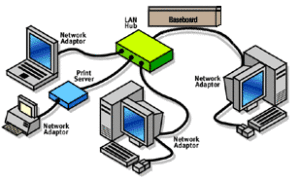
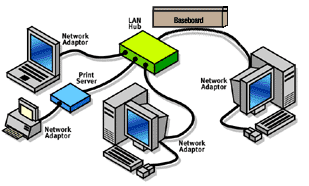
Both Cat5e and Cat6 use 10BaseT “twisted-pair” cabling, because it is ideal for either small, medium, or large networks that need flexibility and the capacity to expand as the number of network users grow.  In a twisted-pair network, each PC has a twisted-pair cable that runs to a centralized hub. Twisted-pair is generally more reliable than thin coax networks because the hub is capable of correcting data errors and improving the network's overall transmission speed and reliability. Also known as “up linking” hubs, they can be chained together for even greater expansion.


Should you install the cabling yourself, or hire a contractor? The smaller the office network, the more tempting it is to install cabling in-house. While this will save installation costs, it is important to be sure that all the cabling is installed and tested to professional standards. If your network encompasses multiple rooms-and/or floors, then hiring a professional cable installer that has experience with data communications networks is the safest and most practical route.  General electricians may not be familiar with all the requirements. Experienced cable installers such as Progressive Cabling will know the right grades of cables and connectors and have the knowledge and equipment to install and test a cabling system.