Ok. So, you sometimes remotely control your office system from your home computer. Or maybe you go on a business trip and you sit at your laptop in your hotel suite and you work and you talk on the phone. Well, I decided to take it to the extreme.
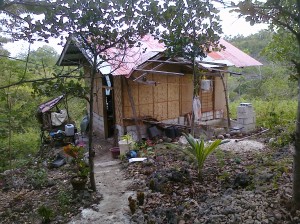
My wife is from the Philippines. And, not Manila. No. She is from Cebu and she grew up in a small town about two hours south of Cebu City called Dalaguete. So, to get to her town is a trip around the world and then a drive down the coast for two hours. Most of the residents in her town do not have indoor plumbing. They do not have a movie theater or a supermarket. Most people here do not have landline phones but they all have cell phones. I don't know anyone here that has Internet,
But I came and have been here for almost 5 weeks. And I have been working remotely. I came here because my wife's father passed away and I sent my wife, Maricor, and our kids here so that they could be with him before he died. but he passed while they were so I decided to make a surprise visit. They were very surprised. And it has been an amazing trip. (If you want to see pictures and videos, friend me on Facebook and you can see them.)
When I first got here, I booked a room at the Just Inn because it was familiar, simple and very affordable. I was told it might have Internet but they didn't. So, we left after the first night. We then moved into the Ocean Bay Resort. Ocean Bay has Internet but we ended up moving to Dakongbato because it also had Internet and a spectacular suite with an amazing cliff side view of the Philippine Sea.
So, with my little Acer Aspire One netbook and my MagicJack VOIP phone jack, I have been working remotely. I am 13 hours ahead of my DC office. And although the Internet is slow, I can remotely control my computer and I can make and accept phone calls from the US. Remotely controlling a large screen monitor with a netbook is very tedious and frustrating. The screen gets shrunk down to a tiny, tiny size. I can't read anything without glasses. Plus it is very difficult to click precisely. The slow Internet means having to wait for my screen to react. But I get my work done. I have to log in and really focus on the tasks I want to do and then I logout.
I also can make and take calls. The bigger problem is that I only have a 2 hour window when I am up late and my clients are just getting there day started. During that time, I make a few phone calls. Otherwise, I am asleep or they are asleep. So communicating with clients has been almost impossible. But I am able to call my employees at night and make sure that they are ok and that everything is being handled. Plus, we use Google's Calendar. So, I can always see what is being scheduled. And, of course there is always email.
 So, the grand experiment in working remotely from a small village in a 3rd world country that is 12 time zones away has been successful. I've been able to work and I have been able to rely on my team to handle the office issues and have a nice 5 week vacation with my family. I was very worried when I left. But everything was going so well that I extended my vacation. It was originally planned to be 3 weeks long! Now... I am wondering... could I move to the Philippines for a year or two and run my business from here?
Hmmmmm.







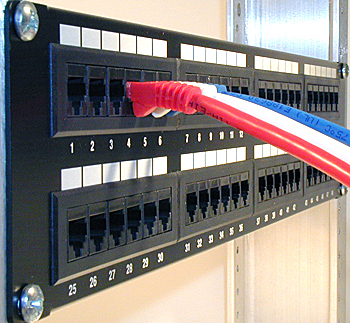
 The network cabling team at Progressive Office, Inc. headed by Richard Elbe successfully completed the network cabling at the Residence Inn on Capitol Hill in Washington, DC. Residence Inn General Manager Patrick McManus says, "The job had challenges but alof our expectations and goals were reached or exceeded."


 A
A