Office Cabling ,Network Cabling

GovDelivery Cat5 Network Cabling Project

12 Mar 2010

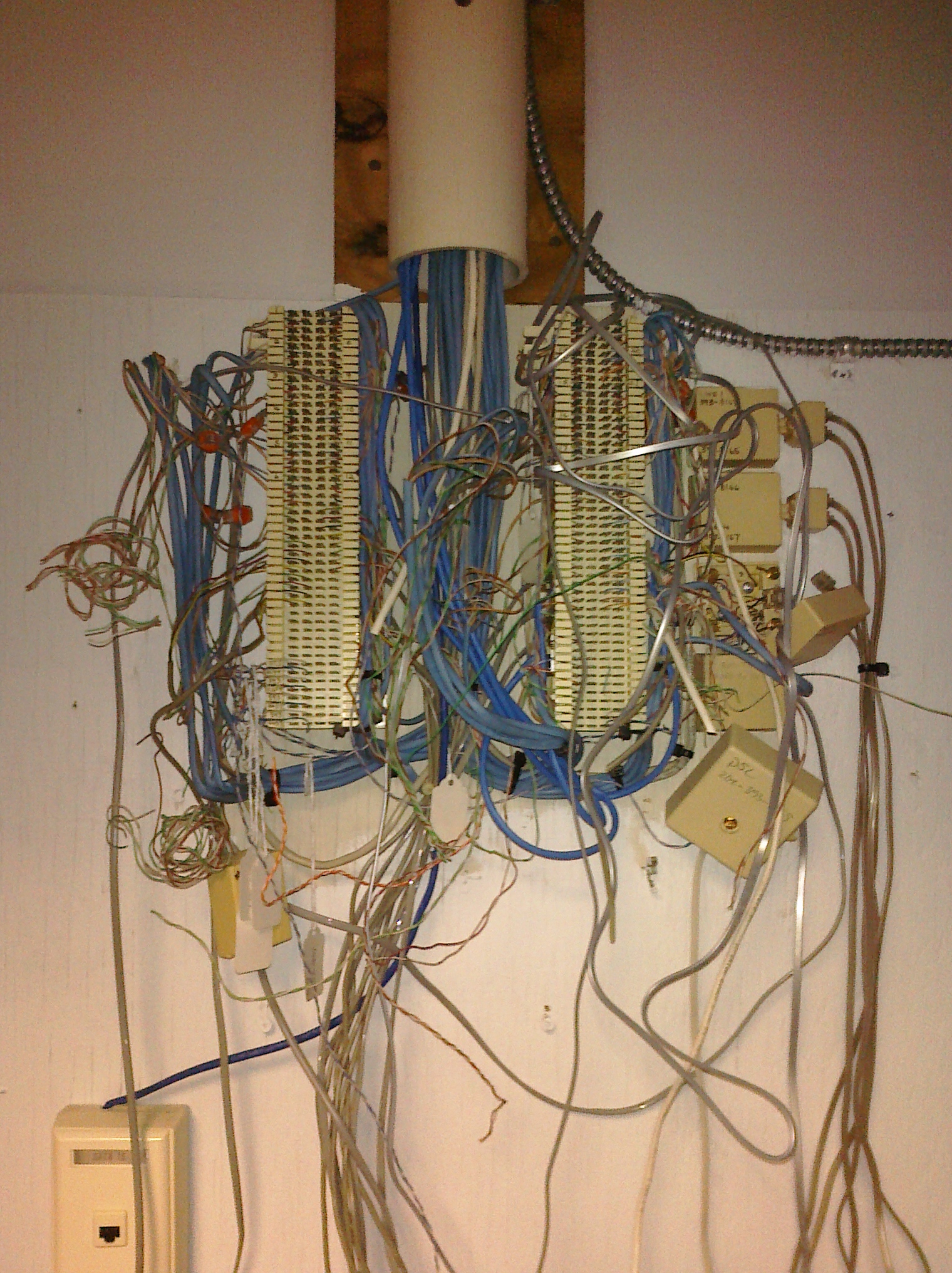
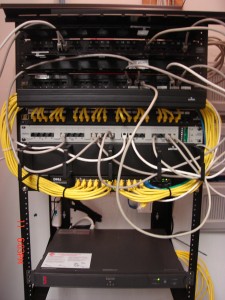
Structured Cabling,Network CablingThis is what the wall closet looked like at the new office at GovDelivery when we first got on-site.  Our job was to add more cabling and to clean up the mess left behind by the previous tenant.


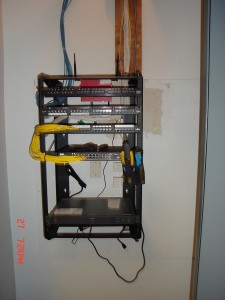
Office Cabling ,Network CablingNetwork Cabling, Structured Cabling,Washington DC After photos of the new Cat5 network wiring system. We removed all of the phone blocks because the new phone system is VOIP and therefore runs on the Cat5 network cabling. Jonathan Banks took our Post Installation Survey and stated that he was "most satisfied "with our price.


Also, see his quote below.


Jonathan Banks of GovDelivery.com says "Progressive Office provided great communication and efficiency throughout the process."


Working Remotely from 12 Time Zones away

1 Jan 2010

Office Cabling ,Network CablingOk. So, you sometimes remotely control your office system from your home computer. Or maybe you go on a business trip and you sit at your laptop in your hotel suite and you work and you talk on the phone. Well, I decided to take it to the extreme.


My wife is from the Philippines. And, not Manila. No. She is from Cebu and she grew up in a small town about two hours south of Cebu City called Dalaguete. So, to get to her town is a trip around the world and then a drive down the coast for two hours. Most of the residents in her town do not have indoor plumbing. They do not have a movie theater or a supermarket. Most people here do not have landline phones but they all have cell phones. I don't know anyone here that has Internet,


But I came and have been here for almost 5 weeks. And I have been working remotely. I came here because my wife's father passed away and I sent my wife, Maricor, and our kids here so that they could be with him before he died. but he passed while they were so I decided to make a surprise visit. They were very surprised. And it has been an amazing trip. (If you want to see pictures and videos, friend me on Facebook and you can see them.)


When I first got here, I booked a room at the Just Inn because it was familiar, simple and very affordable. I was told it might have Internet but they didn't. So, we left after the first night. We then moved into the Ocean Bay Resort. Ocean Bay has Internet but we ended up moving to Dakongbato because it also had Internet and a spectacular suite with an amazing cliff side view of the Philippine Sea.


So, with my little Acer Aspire One netbook and my MagicJack VOIP phone jack, I have been working remotely. I am 13 hours ahead of my DC office. And although the Internet is slow, I can remotely control my computer and I can make and accept phone calls from the US. Remotely controlling a large screen monitor with a netbook is very tedious and frustrating. The screen gets shrunk down to a tiny, tiny size. I can't read anything without glasses. Plus it is very difficult to click precisely. The slow Internet means having to wait for my screen to react. But I get my work done. I have to log in and really focus on the tasks I want to do and then I logout.


I also can make and take calls. The bigger problem is that I only have a 2 hour window when I am up late and my clients are just getting there day started. During that time, I make a few phone calls. Otherwise, I am asleep or they are asleep. So communicating with clients has been almost impossible. But I am able to call my employees at night and make sure that they are ok and that everything is being handled. Plus, we use Google's Calendar. So, I can always see what is being scheduled. And, of course there is always email.


Office Cabling, Network CablingSo, the grand experiment in working remotely from a small village in a 3rd world country that is 12 time zones away has been successful. I've been able to work and I  have been able to rely on my team to handle the office issues and have a nice 5 week vacation with my family. I was very worried when I left. But everything was going so well that I extended my vacation. It was originally planned to be 3 weeks long! Now... I am wondering... could I move to the Philippines for a year or two and run my business from here?


Hmmmmm.

Wireless Access at Hotel Saves Clients

28 Dec 2009

I met with the General Manager of a Holiday Inn in Northern Virginia. She manages a 200-unit building in Arlington, Virginia, an affluent suburb of Washington, DC. Her property provides rooms and facilities to handle meetings and conferences for vacationers and business travelers. She told me that she is trying to get wireless access installed into her building because she is losing business and wasting money.


She said that her hotel is providing free Internet access but her competition is providing free wireless access. Clients and management prefer wireless because it is much easier to manage and access. Clients don't like having to plug in a cable and having to make changes to their network settings to enable network access. Management does not like having to deal with multiple failure points in managing the hundreds of routers spread throughout the building. There is one in each room.


So, they have a lot of complaints about Internet access. It is not convenient. Sometimes clients don't even have a patch cable. So, the problems are overwhelming for both sides. Additionally, they have Meeting and Conference Rooms that are not hard-wired. So, every time they schedule a Conference for a business client they also have to pay their Internet Service Provider (ISP) to extend a bundle of network cables into the Meeting and Conference Rooms. As you can imagine, this is a hassle and a large financial expense. It cuts into their profit margins. And it is also a major inconvenience for both the staff and the customers.


We have presented a proposal to install network cabling and I expect to get approval in the coming weeks. It will save them time, money and reduce their efforts in providing reliable and fast Internet to their clients. I will update this posting as things progress.

Cat5,Hotel network cabling

Residence Inn Capitol Hill Wireless Access Cabling

28 Dec 2009

Cat5e,Hotel network cablingThe network cabling team at Progressive Office, Inc. headed by Richard Elbe successfully completed the network cabling at the Residence Inn on Capitol Hill in Washington, DC. Residence Inn General Manager Patrick McManus says, "The job had challenges but alof our expectations and goals were reached or exceeded."
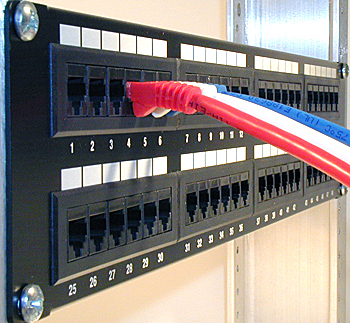

The job involved installation of Cat5 cable to all of the odd floors of the 13 story property. Each floor has access panels installed that safely host surface-mounted wall jacks inside of the ceiling on each floor. Riser cables were minimized by consolidating cables to patch panels on every fourth floor. The system now provides Innflux with the infrastructure to enable wireless access throughout the property including the Meeting and Conference Rooms.


The job was completed on budget and on-time with no extra charges or cost overruns. Progressive Office specializes in hotel cabling to enable wireless access services to guests. Please call Stu at 202-462-4290 or click on the icon to submit a response to a Questionnaire that will enable us to provide a quote for your hotel.

Network Cabling, Data Cabling ,Cat5e ,Cat6/6a Cabling

Computer Network Patch Panel

23 Dec 2009

Network Cabling ,Data Cabling, Cat5e, Cat6/6a CablingA patch panel is an in-line series of connections mounted onto a frame to enable network cables to be terminated in an orderly manner. Typically, the panel is the termination point of network cabling drops that are installed in a office or residential cabling system.It is numbered and comes in 12-port, 24-port, 48-port and 96-port configurations. The numbering of the panel ports allows for the network installer to label the wallplates to match the corresponding connection at the patch panel.


Patch panels are most commonly used for computer data networks but as Voice Over Internet Protocol (VOIP) phone systems become more common, we are seeing phone systems being terminated into panels. They are wall or rack-mounted. In small offices, a 12 or 24-port patch panel might be wall-mounted to a wooden mounting board. Larger office networks will usually require a rack mounted series of  panels.


The patch panel comes in Cat5, Cat5e and Cat6 types to match the cable being installed. The connections on the panel are RJ45 that are designed to allow for a cable to "punch-downed" into the connector. The connector has 8 punch down points to accommodate the 4-pairs of wires in a Cat5/6 cable.

Data Cabling, Cat5e, Cat6/6a Cabling

Microsoft has it backwards

7 Oct 2009

The myth that Microsoft has created is that the Windows operating system needs to keep getting bigger and more functional. With each new release the OS grows bigger with new applications, new graphic interface designs and new utilities. But if you take a look at the cell phone industry, you can see that the PC and the cell phone are converging.Internet Marketing quote


The new cell phones from Blackberry, Apple and Plam are meant to do much more than make phone calls, send and receive messages, and browse the Web. It's a platform, like a PC, that's designed to run a wide variety of sophisticated third-party programs, or apps, from social-networking gateways to games to business tools.

Read More

Cabling Definitions

24 Sep 2009
Backbone wiring is the cabling used to interconnect between telecommunication closets, equipment rooms and buildings.

A 19-inch rack is a standardized frame or enclosure for mounting multiple equipment modules. A frame style, open rack (see image to the right) would have outer posts but no front or side panels.  An enclosed rack has sides and a door for security and usually includes ventilating fans to keep equipment cool. Enclosures are much more expensive than open racks.

Racks have a front panel that is 19 inches wide, including edges or ears that protrude on each side which allow the shelves, switches and patch panels to be fastened to the rack frame with screws.

Rack Unit or U is a unit of measure that describes the height of equipment to be mounted in a computer equipment rack.  One rack unit is 1.75 inches (44.45 mm) high. The size of rack-mounted equipment is described as a number in "U". For example, one rack unit is referred to as "1U", 2 rack units as "2U" and so on. A typical full size rack is 42U, which means it holds just over 6 feet of equipment.

wallplate-cat5

Wall Plates are the metal or plastic covers that house the network connection jack. Wall plates are flush-mounted on office and residential drywal surfaces.

RJ45 Connector is the modular connector that is found at the end of a network cable. It is similar in look functionality to a phone connection cat5cablebut it is larger in size and it has 4-pairs of wires rather than the 2-pairs that are found in a phone line.

Jacks and Inserts are the actual connection at the wallplate. They are often color coded to distinguish the different connections such as voice and data.

Patch Panel is a series of 24, 48 or 96 RJ45 network connectors on a patchPanelcat5-insertpanel. The patch panel is the hub of all incoming workstation network connections.

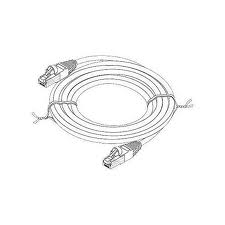
Patch Cable is a network cable with RJ45 connectors at each end that create the connection from the wallplate to the computer and also from the patch panel to the switch.

Horizontal wiring encompasses all cable from a wallplate network connection to the wiring closet. The outlets, cable, and cross-connects in the closet are all part of the horizontal wiring.

Wiring closet is an enclosed area, such as a room or cabinet, for containing network, telecommunications equipment, and cable terminations. Each building must have at least one wiring closet.patch cable

Equipment room is the space that houses the office network and telecommunications systems such as PBXs, racks, servers, and the mechanical terminations of the cabling system. Larger facilities often have Equipment Rooms rather than Wiring Closets.

Cabling administration is a process that includes all aspects of premise wiring related to documenting and managing the system, testing the system, as well as the architectural plans for the system.


Click here to go to a page that will put you in touch with us. Answer all of the questions that you can and we will get back to you with a quote.
cat6-cabling,data cabling,

Cat6 Cabling – Usage and Methods

24 Sep 2009


Category6


cat6-cablingCategory 6 cable, commonly referred to as Cat6, is a cable standard for Gigabit Ethernet and other network protocols that is backward compatible with the Category 5/5e standards. Cat6 features more stringent specifications for crosstalk and system noise. The cable standard provides performance of up to 250 MHz and is suitable for 100BaseTX and 1000BaseT (Gigabit) Ethernet.


The cable contains four twisted copper wire pairs, just like earlier copper cable standards. Although Cat6 is sometimes made with 23 gauge wire, this is not a requirement; the  specification states the cable may be made with 22 to 24 AWG wire, so long as the cable meets the specified testing standards. When used as a patch cable, Cat6 is normally terminated with an 8P8C modular connector, commonly referred to as an "RJ-45" connector. Cat6 connectors are made to higher standards that help reduce noise caused by crosstalk and system interference.


Some Cat6 cables are too large and may be difficult to attach to RJ45 connectors without a special modular piece and are technically not standard compliant. If components of the various cable standards are intermixed, the performance of the signal path will be limited to that of the lowest category. The maximum allowed length of a Cat6 cable is 100 meters (330 ft).


quote iconThe cable is terminated in either the T568A scheme or the T568B scheme. It doesn't make any difference which is used, as they are both straight through (pin 1 to 1, pin 2 to 2, etc). Mixing T568A-terminated patch cords with T568B-terminated horizontal cables (or the reverse) does not produce pinout problems in a facility. Although it may vary slightly or sometimes degrade signal quality, this effect is marginal and certainly no greater than that produced by mixing cable brands in-channel. The T568B Scheme is by far the most widely used method of terminating patch cables.


Click here to go to a page that will put you in touch with us. Answer all of the questions that you can and we will get back to you with a quote.


Plenum Cable Definition

24 Sep 2009
Plenum cable is cable that is laid in the plenum spaces of buildings. The plenum is the space that facilitates air circulation for heating and air conditioning systems, by providing pathways for either heated/conditioned or return airflows.patch cable

Space between the structural ceiling and the dropped ceiling or under a raised floor is typically considered plenum. The plenum space is typically used to house the communication cables for the building's computer and telephone network. Additionally, no high-voltage powered equipment is allowed in the plenum space because presence of fresh air can greatly increase danger of rapid flame spreading should the equipment catch on fire.

quote iconNote that diligence is required to make sure that a non-plenum airspace stays that way. A non-plenum airspace can become a plenum airspace by accident if the ductwork is disconnected and not properly repaired. Ductwork degradation can occur due to building damage such as earthquakes, aging or adverse environment causing the metal to corrode and fall apart, or simply negligence on the part of building contractors that leave work unfinished. Discovery and repair of unintended plenums is difficult due to the hidden nature, limited space, and difficult access of most installed drop ceilings. For highest fire safety it is best to assume all drop-ceiling airspaces are plenums, whether or not they are officially designated as one.


Click here to go to a page that will put you in touch with us. Answer all of the questions that you can and we will get back to you with a quote.