Network Cabling Data Cabling Cat5e Cat6/6a Cabling

Cabling Tips for Security Cameras

11 Nov 2023

CablingNetwork Cabling, Data Cabling, Cat5e, Cat6/6a Cabling,security system is definitely not the showy part of any security system. Nevertheless, it is an essential component of the system. It may seem complicated. There are many considerations in choosing and installing cables to ensure that the security system functions properly. Cables basically provide power for camera installation and transmit signals going back to the digital video recorder (DVR).


Deciding on the Perfect Cabling


Find out whether the system is analog (alternating current frequency has been modified) or digital (electronic technology). Then, you can figure out the proper cable for installation of your security cameras. Or simply refer to the manufacturing specs on the camera system.


The second step is to determine if your camera is powered remotely or connected to a nearby power outlet. It may be necessary to combine power and video cables. Security power and video cables can run next to each other or within one cable jacket. This makes installation easier by pulling one instead of two separate wires.


Make sure to test the cable before you install the CCTV. Examine each cable at the DVR position just to make sure that the cables are working prior to installation.


Cabling Guidelines


Quite often security cameras require coaxial cables to send video from the camera to your recorder. With the RG59 type of coax cable, it is possible to position the camera up to 600 feet away. The RG6 coax cable, on the other hand, may be extended up to 1,000 feet. Cut the cable according to your preferred length but leave an extra service loop of 10 – 20 feet for future flexibility.


What are the steps to follow?


  • Make the necessary BNC connection on the cable. This is a small quick round connector primarily for coaxial cables.

  • Plug one end of the BNC cable to the camera and the other to your DVR.

  • Strip the shield of the power cable to expose the black and red wires. Then, remove the jacket (at least ¼ inch) from each wire.

  • Put the wires inside the terminal block at the end of the female power wire plait. It should be red on red wires and black on black wires. Tighten screws on the terminals. Plug the camera into the fitting at the side of the braid.

  • Attach wires directly to the positive and negative leads respectively in the power box. Red wire is for positive while black is for negative. This is applicable if you will connect the camera to a multiple camera power supply unit.

  • In case you will attach the camera to a single power unit, connect the male power wire braid as well as power supply to the tip of the tress.


Now, the installation is complete and you are ready to use the system.


Network cabling, NetworkTopologies.

Essential Facts About Cabling System

14 Dec 2014

Network cabling, NetworkTopologies.Your office cabling system is costly and complicated investment. It's also a commitment to an office design and structure that is not easy to modify. If you add more workstations later, new cabling might be needed.


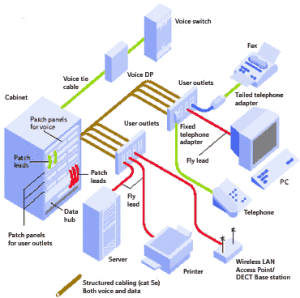
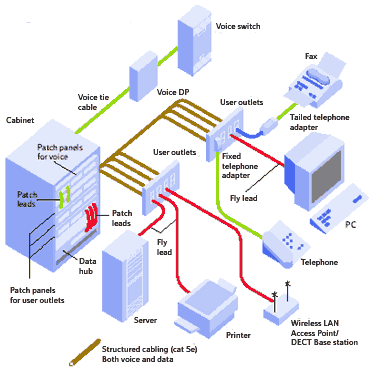
Most offices have a structured cabling topology that hardwires the cables from wallplate to patch panel. With this system, modifications are less likely because the initial installaiont includes a planning process that should anticipate some expansion. By pre-wiring potential locations in an existing or newly-constructed building, future moves, additions or alterations are avoided. You can just transfer patched cables in the wiring closet. Also, it is critical to number the wallplates to match the corresponding patch panel number. This will make it much easier to relocate a workstation or to troubleshoot a connectivity problem.


There are several sub-systems to consider:


  • The Demark refers to the point where the Internet Service Provider's (ISP) data line comes to an end and hooks up with the cabling in the building.

  • The equipment room serves as storage for all apparatus and wiring integration points.

  • Backbone cabling are high-speed cables (typically Cat6 or fiber) that connect various floors or wall closets.

  • The horizontal cabling for links up the network space to individual wallplates. These are done through conduits and ceiling spaces on every level.

  • The telecommunications enclosures are wall or floor mounted cages that hold the network equipment; primarily the patch panels ands switches but also sometimes the server and Uninterruptible Power Supplies (UPS) too.


Installation and design of structured cabling is regulated by standards that identify the following:


  • Network data switches

  • Offices layout for voice & data communications for Cat5e or Cat6 cable

  • Fiber Optic cables for backbones

  • Modular connectors at the wallplate


These components will guide the layout of cables in order to fulfill the data access requirements of your office. All of the cables start at the patch panel on a mounted rack (about 19 inches wide) in the wall closet. From there, they traverse through the drop ceiling and down the walls to individual wallplates. Quite often a wallplate will host 2 or more connections. At the wallplate a short patch cable, usually 7 to 14 feet in length wil connect the computer, phone, printer or other networked device.


All cabling standards require that all of the eight conductors in Cat5, Cat5e and Cat6 cables are inter-connected in a precise color-coded pattern. The network cable connects each device but some devices can share a single cable. This is true for VoIP phones. Most VoIP phones have a jack for the network cable and then a jack on the phone for connecting the computer. This pass-thru enables the two devices to share one connection.

Cat5e Cat6/6a Cabling,Office Cabling

Handling Cat5/Cat5e Cabling

19 Nov 2014

cat 5e,Network cabling, cables, Atlanta GAInformation Technology specialists have to choose the kind of cable to utilize for their networks. Cat5 has been one of the main choices for decades. This is because Cat5 supports 10/100 Ethernet which includes Fast Ethernet. In recent years, Cat5e has become the dominant choice for new cabling projects. And Cat5e cable is also backwards compatible. Your computers, phone and other network devices will work on Cat5e cable.

One handling issue is the electrical interference

Read More

Network Cabling Data Cabling

Fundamentals of Structured Cabling Systems

15 Nov 2014

structured cabling, Network Cabling, Data CablingThe structured cabling system is a comprehensive structure of wiring and the related hardware involved. This system ensures a complete and reliable telecommunications infrastructure. This network has several  but mostly for providing telephone services or conveyance of data over a  computer network. This type of cabling system also connects to the internet at the demarcation point.


A quality structured cabling installation has these common elements:


  • It must fir the architectural configuration of the building that hosts  cabling installation

  • It made up of cable and connection fixtures

  • It connects equipment that cabling is setup to support

  • Can be designed to enable retrofitting and upgrading

  • Meets the objectives and requirements of the business

  • Is backed by a guarantee by the manufacturer and the installer


As installers, we use standardized techniques in the completion and upkeep of cabling systems. This is important to guarantee satisfactory system performance on a technically complicated infrastructure. The benefits of adhering to these standards are that they insure stability of connectivity after setup.


 Structured cabling installations may include:


  • Entrance facilities

  • Perpendicular and horizontal backbone conduits or cables

  • Horizontal lanes

  • Work area facilities

  • Equipment areas

  • Telecommunications racks and cabinets


A cabling connector refers to the mechanical device used in connecting a cable to a device or from one cable to another. The connector provides the coupling device that can minimize losses.  For fiber, it permits light signals to move from one connector to another. On the other hand, copper enables electrical impulses to be conveyed. It is important to properly align these  connectors to prevent connectivity breaks. Likewise, it should insure the efficient transmission of data. Connectors are crucial to the reliability of the total telecommunications network.


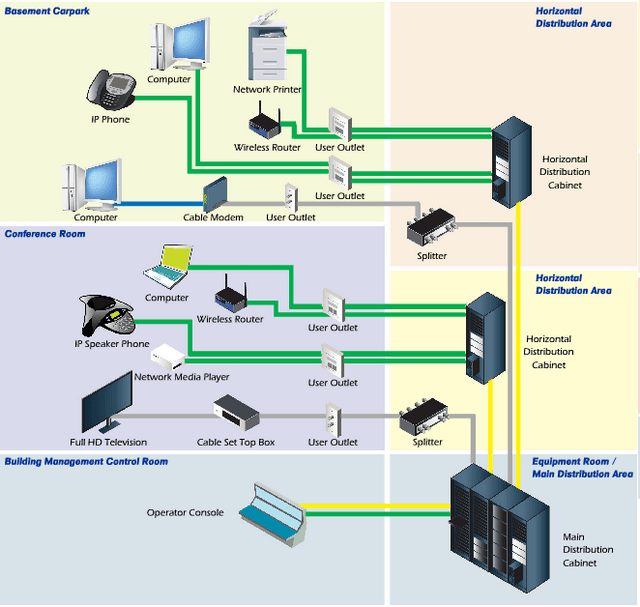
There are six subsystems in the structured platform. These are entrance facilities, equipment rooms, backbone cabling, telecommunication rooms and enclosures, the cabling, and the work area.  The first consists of cables, network boundary, hardware for connection, security devices, and equipment attached to the network cabling. Backbone cabling consists of subsystems that provide inter-connection between telecommunication, network equipment and access facilities.  Quite often these are the higher speed cabling components such as Cat6 and fiber that connect among the switches of an office.


Horizontal cabling connects from the desktops and phones to the telecommunications rooms and enclosures. The maximum horizontal cable length should be at no more than 100 meters. These desktop components extend out from the wall plate connection end of the horizontal cabling system to the equipment in the wall closet.


Call us if you need troubleshooting or if you have a need for cabling at your office due to expansion or relocation of your firm. We do free on-site surveys and quotes.

network cabling,cat6 cable

What are the advantages and disadvantages of Cat6 cabling?

7 Nov 2014

network cabling,cat6 cableAs the price of Cat6 cable has come down, the answer is yes. You get 500% more speed for about a 25% higher price. Unless you really just don't need more speed, go with Cat6.
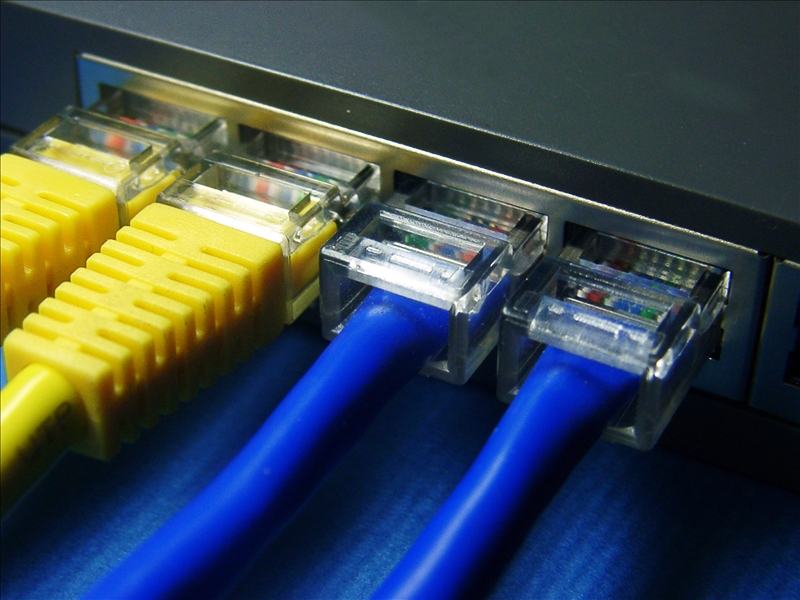
Category6 or Cat6 cables have established standards for the Gigabit Ethernet. This variety is backward compatible with Category 5 and 5e as well as Category 3 cable. Cat6 facilitates computer networks by providing high-speed data transfer rates. Performance can be described as optimal if other components within the network are also running at gigabit speeds.


What are the upsides?


Cat6 is fast. It has the capability to handle maximum speed performance of 250 MHZ. The network includes Gigabit Ethernet along with 10-Gigabit Ethernet. With complementary routers, interface cards, switches, and patch panels a complete gigabit network is possible. Information Technology professionals are aware that Cat6 cable provides exceptionally fast network performance and gigabit speeds.


The composition is similar to Cat5 Cable. There are eight wires which are coiled together forming four pairs. With Cat6, each pair of wires is designed to be insulated from the others so it can produce twice the communications capacity of Cat5 and Cat5e. Cat6 cables plugs and ports are compatible to Cat5 and Cat5e. It may not have the same maximum speed of the computer cable but it will still function.


You can upgrade to Cat6 cable if your current network is not performing at a productive speed in retrieving and saving your data files. Even small enterprises are now thinking of installing this model because it is fast emerging as the industry standard.


However,  Cat6 cable is  more expensive. It will surely be a waste of resources in cases where greater data speeds are not needed. That is why some users opt for Cat5e which is less expensive while still providing splendid performance.


At the same time, you are not guaranteed 100 percent full speed. Sometimes, there is a misconception that purchasing a Cat6 cable will offer users the whole gigabit bandwidth on your network. The truth is Cat6 cable will only generate full speeds if all of the components in the network can function at gigabit speed. In case a single part (network card, patch panel, switch or connector) is not gigabit rated, the network may work at the slowest speed of the slowest component device.


You might be persuaded to buy Cat6 without really understanding if it will really produce the desired impact on the network. This is why it is essential to learn everything about the product before you make a decision.


Call us at 202-462-4290 before you decide so that you can get a free on-site analysis that will pinpoint your network cabling needs.


Network Cabling Data Cabling

Distinguishing between Cat5 and Cat6 Network Cables

12 Jun 2014

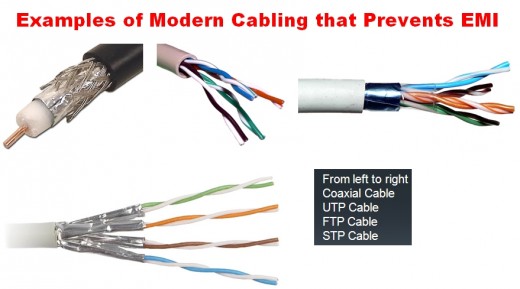
Network cablesCAT 5,Network Cabling Data Cabling connect and transmit information between personal computers, storage area networks and routers. You can now find various models of cables. Your choice may depend on configuration and topology of the system’s architecture. The most common variety is known as twisted pair cable in local area networks. Numerous Ethernet networks use this type of cable. It is composed of four pairs of fine wires or conductors. Each pair is entwined several times to prevent obstruction from other cables and devices.


The CAT5 or Category5 is an example of twisted pair cable

Read More

Data Cabling,Structured Cabling,Washington DC

Advantages Of Hard-wired Cabling Over Wireless Networks For Database Applications

5 Jun 2014

 Network Cabling Data CablingCorporate organizations need to share information efficiently. There are two options for them when it comes to setting up database applications; it is a choice between hard-wired cabling and a wireless network. Wireless systems provide users with more mobility. However, the majority of enterprises prefer the wired model for more control, security, consistency and speed. These are the major upsides of going for physical connections. It is comparatively economical since the cost of cabling, even with the lengths needed to cover a standard office space, is generally cheap.
Read More

Network Cabling, Data Cabling ,Cat5e ,Cat6/6a Cabling

RJ-45 Connectors Made Easy

18 Apr 2013
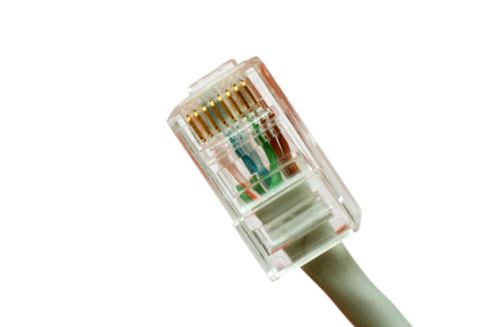
 Network Cabling, Data Cabling ,Cat5e, Cat6/6a CablingWhat is the difference between a Cat5 and a Cat6 RJ45 connector?

The easy answer is:  they are both cable connectors with a standard network plug and socket, often called an “Ethernet jack”.

Cat 5 and Cat 6 are UTP, or Unshielded Twisted Pair cables.  The difference defines the cables as Category (Cat) 5 or Cat 6 UTP cable. Both are terminated by RJ45 connectors.
Read More
Structured-Cabling,Data Cabling

What is “Structured Cabling”?

14 Mar 2013

Structured-CablingStructured cabling is a telecommunications cabling infrastructure consisting of a number of standardized smaller elements called subsystems.


Structured cabling falls into five subsystems:

  1. A Demarcation point is the connection point where the telephone company network ends and the customer’s on-premise wiring connection begins.

  2. Equipment or Telecommunications Rooms contain equipment and wiring points that serve the users inside a building.

  3. Vertical or Riser Cabling connects between the equipment/telecommunications rooms on different floors.
    Read More
Network Cabling ,Data Cabling

What is “Alien Crosstalk”?

8 Mar 2013

 Network Cabling, Data CablingNo, it’s not ET calling home. “Alien Crosstalk” is defined as “unwanted signal coupling from one balanced twisted-pair component, channel, or permanent link to another”.


Alien crosstalk is not generally affected by common noise from motors, transformers, or florescent lighting fixtures. Alien crosstalk is specified as “a parameter for cabling to approximate the energy present when all cabling pairs are energized”.

Read More