Data Cabling, Cat5e Cat6/6a Cabling, Washington DC

Cat6 Q&A

4 Feb 2013

Data Cabling ,Cat5e ,Cat6/6a CablingWhat is Cat6? Cat6 components are interoperable between different vendors and are fully backward compatible. Cat6 has the same nominal Impedance of 100 Ohms as Cat5 and 5e components, but with tighter tolerance on Impedance variations. Transmission parameters are specified to 250 MHz, compared to 100 MHz for Cat 5/5e.


Do Cat6 components behave differently?   The diameters of Cat6 cables range between 0.21 to 0.25 inch (5.3 - 5.8 mm) compared to Cat5/5e’s range of 0.19 to 0.22 inch (4.8 – 5.5 mm).   Cat6 also has a tighter twist length to reduce crosstalk interference.


What about installation?  Cat6 cables and components are installed similar to Cat5/5e. There are design and installation issues that contractors and installers must pay greater attention to; including cable terminations and the pathway fill.


Will Cat6 supersede Cat5/5e?  Yes. The only question is when. The installed cost for Cat6 cabling can be about 20 % higher than Cat5e, but prices will decrease as usage increases.


Will Cat6 deliver what is promised?  Yes. There are no technical obstacles. Test parameters and procedures to qualify Cat6 components to ensure interoperability between different vendor’s products are in place and detailed.


What about the installed performance compared with Cat5/5e?  The biggest benefit is much-improved Signal-to-Noise Ratio at the Receiver:  Cat6 provides about 16 times better Signal-to-Noise Ratio compared to Cat5/5e over a wide frequency range.


Why do we need Cat6? The real question is “is Cat5e good enough for today and in the foreseeable future?”  The answer is “Yes, but…”. Network switch ports are often at the “marginally compliant” limits of the IEEE standard and susceptible to cabling and temperature variations. Cat6 provides fewer bit errors than Category 5e for 100BASE-TX and 1000BASE-T applications.

Network Cabling,data cabling,,DC

Network Cabling Issues

4 Jan 2013

Cat5 ,Cat6 ,lan cableGiven that labor costs for installation are much higher than the material cost for cable; your first requirement is to use the highest grade cable available. Cat5e is the most common, but Cat6 is becoming the standard as it is rated for a higher frequency signal, a somewhat higher cable quality, and has tighter specifications for noise and crosstalk. Both Cat5e  and Cat6 can handle gigabit speeds.
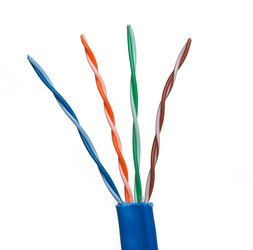

Both Cat5e and Cat6 use 10BaseT “twisted-pair” cabling, because it is ideal for either small, medium, or large networks that need flexibility and the capacity to expand as the number of network users grow.  In a twisted-pair network, each PC has a twisted-pair cable that runs to a centralized hub. Twisted-pair is generally more reliable than thin coax networks because the hub is capable of correcting data errors and improving the network's overall transmission speed and reliability. Also known as “up linking” hubs, they can be chained together for even greater expansion.


Should you install the cabling yourself, or hire a contractor? The smaller the office network, the more tempting it is to install cabling in-house. While this will save installation costs, it is important to be sure that all the cabling is installed and tested to professional standards. If your network encompasses multiple rooms-and/or floors, then hiring a professional cable installer that has experience with data communications networks is the safest and most practical route.  General electricians may not be familiar with all the requirements. Experienced cable installers such as Progressive Cabling will know the right grades of cables and connectors and have the knowledge and equipment to install and test a cabling system.

Cabling Network Cable Twisted Pairs

Cat5, 6 and 7 – What the Numbers Mean

2 Jan 2013

Category 6 Network Cable Twisted PairsCategory (Cat)5, 5e, 6 and 7 are different standards for cables used to transmit data through networks. All are twisted copper cables. The difference is based on their performance level.


Cat5 has become the world standard for connecting Ethernet devices. It is inexpensive and very effective; making it the most commonly used cable for connecting Ethernet devices. There are  two types, the Unshielded Twisted Pair (UTP), and the Screened Twisted Pair (SCTP).  SCTP adds a protective covering to protect against interference.  Cat5 is ideal For long distance communications as it is rigid and has the capacity to support 10-100 Mbps and 100MHz.
The gradual shift from standard 10/100 networks to gigabit networks has challenged Cat5 as it  cannot support high speeds. This led to an upgraded version, Cat5e.


Cat5e was developed to makeCat5 compatible with gigabit networks and provide extra protection from interference. However Cat5e does not completely remove interference, which results in slow and often poor performance, but Cat5e does makes networks more reliable and faster.

Cat6 is more advanced than Cat5 and Cat5e.  Like Cat 5 and 5e, it uses 4 twisted pairs of copper cables, but with much better performance. The difference comes from a longitudinal separator that keeps all 4 wires separate from one another, reducing interference or “cross talk”, and a faster rate of data transfer.  Cat6 can be used in any network that employed Cat5 and Cat5e. Cat 6 is the next level standard for Ethernet connection.

Cat7 is the next generation cabling device for Ethernet connections. It improves internal signaling and exterior protection over Cat5 and Cat6 and can support 10gigabit connections  adaptable to standard Ethernet connectors.

Office Cabling, Network Cabling

Awareness Lacking on Smart Grids

21 Dec 2012

 Office Cabling, Network CablingResults from a collaborative research study by the Continental Automated Buildings Association (CABA) has found that the concept of a “connected home” provides great benefits in terms of controllability, energy saving and security for homeowners. However, it also found a lack of awareness and also confusion regarding what products and services are best suited for consumers, and the lack of defined cost benefits are key issues that have kept the industry from moving forward.

Only 39% of consumers had even a small level of understanding of what is a “smart grid” is, or any awareness of “smart” and “green” home technology possibilities. Of the consumers who had even a general awareness of smart grids, only 34% attribute this awareness to marketing campaigns by local utilities. Yet, energy efficiency will be the major concern for homeowners in the near future; and demands for reduced expenses and connected, energy saving products and services will increase. The need for manufacturers and utilities to team with telecommunication companies is obvious, as consumers will anticipate and expect these technologies to provide solutions in the near future.


A number of world-class companies and organizations, including Comcast Communications, Consolidated Edison of New York, IBM, Microsoft, Samsung Telecommunications America, Pacific Gas and Electric Company, Southern California Edison, and Qualcomm, among others, have teamed to support this project. Their research determined the potentials of connected home technologies and strategies that companies can adopt to capitalize on the emerging “smart grid” in North America.

Cat5 Cat6 Network Cabling,Washington DC

The Good, the Bad, and the Ugly: Cabling Lessons Learned

14 Dec 2012

Cat5, Cat6 data cables ,connected to serversA magnetic field when running low voltages. Unfortunately, when this unshielded cabling creates a magnetic field created. Any electrical cabling bear by disrupts communication, slowing transmission or preventing Network cabling is a tricky. Even with a solid background, technicians without adequate knowledge and training can make mistakes that may shut down an entire system. Here are some typical mistakes seen in network cabling.


Plan for the Future.  Cat5 may be the cheaper option, but can cause problems when upgrading is needed. Install Cat5e or Cat6 cables with options for upgrades to save labor costs.


Don’t Mix and Match. Twisted pair cabling was often out of the price range for many companies, so priority was given to data, while voice had with cheaper cabling. Now, VoIP has made voice equal to data in importance and need. Fortunately, a typical VoIP phone has a built-in Ethernet connection or pass-thru that is compatible with almost any data cable, which decreases installation costs.


Don't put Electrical Cables Next to Data Cables. Data cables use twisted pairs of wires inside that help produce transmissions altogether. This generally happens when the cables are running parallel, so if your cable is near a power line, lay them perpendicular to the power line.


 Not Laying New Cable When You Need To. Ethernet switches are convenient, but can be misused. Mini-switches are often added to provide a few extra ports; but this can cause bottlenecks and instability. Add extra cable instead, if more network resources are needed.


Forgetting Cable Management. “Ladder racks” add extra cost to an installation, but they also make the installation look better, run better, and easier to maintain and update. Also, don't forget to color code or label your cables, so technicians can actually find the right cable later.

Data Cabling, Cat5e ,Cat6/6a Cabling

Pulling cable through a basket tray via remote control tank

30 Aug 2012

This video demonstrates how we used a remote control tank named Brutus to pull cable through a basket tray that is installed above the ceiling tiles in an office. For large cabling projects it is typically useful and necessary to install a ladder tray above the ceiling tiles to carry the large bundles of cables along the corridors of a floor. At this project, the General Contractor installed basket tray. Basket tray does not provide for easy access underneath which made it especially difficult to pull the cable along. Even getting a pull string through this tray was challenging. So, we bought a remote control tank. We named him Brutus. And we attached the pull string to his back and had him drive the string along the entire length of the tray.


Go Brutus!


International Cooperating Ministries – Cabling Project Notes

20 Aug 2012

Project Objectives and Details based on site survey by Richard Elbe


Number of Drops: 110 total cable drops

  • 47 double network drops

  • 1 single network drop

  • 3 network printer drops

  • 3 media box wallplates with (2 HDMI, 2 VGA and 3 RCA Jacks)


Ceiling: Non-plenum, separate ducting allows for Cat6 PVC cable rather than the more expensive plenum cable.

Racks: 6' x 19" Relay Rack

Switches: Five 24,port Netgear Gigabit switches that will leave room for 4 ports per switch for future expansion of the network.
Read More
Data Cabling, Cat5e, Cat6/6a Cabling

US Court of Appeals Veterans Affairs – Cabling Project Notes

18 Jun 2012

Project Objectives (Do not call, this project has been COMPLETED)


Number of Drops: 360 (140 duals, and 20 quads)

Ceiling: Non-plenum, separate ducting

Racks: Enclosed, 19”, will already be installed by customer

Switches: Provided by customer, 48 port

Patch cables: None necessary. They will provide patch cables from wall plate to computers and from patch panels to switches.

Labeling and documentation of all cabling is important. How this looks is important to them. Please provide a spreadsheet of all wallplates and rooms.

  • Location is behind elevators.

  • All workstation runs will terminate in wiring closet behind elevators.

  • We will mount patch panels in this closet on the wall. Use 24port, Cat5e, patch panels.

  • They will mount racks for switches.

  • 4 pairs of fiber will run from the closet to the server room on the same floor. We are to provide the cabling plant for the fiber.


Office Cabling Network Cabling

Server Room:


  • 2, 24 port patch panels per rack.

  • Cabling plant for fiber to switch closet.


Existing server room


Click HereThey want cable management hardware to be part of the solution. What you see in this room is what they’re cleaning up and looking to make high end and professional in the new location. Photos here include existing fiber. Note the ceiling cable management rack. In the new location these will be in place in the server room and along the ceiling in the main hallways.


New server space - Roughed in area they’re moving to.


General Floor Space:


  • Quad drops in each office and cube in the technology area

  • Dual drops in all other offices

  • 6 drops for cable t.v.

  • Wall facing outside is already dry walled and insulated


Part of that wall has large window with wall space under it. Customer is unsure if drops will go there or anywhere along that outside wall.

Includes the outside wall. They’re not sure if there will be drops along this wall. If so it’ll be interesting because of the insulation. Also note that they MAY want drops under the windows along this wall.

There are some pictures of the ceiling details. Also note that the client will already have cabling runners ceiling mounted down the middle of the two main hallways to the server room.


Special Fiber Optic Line Item Bid:


US Court of Appeals wants this as a line item so they can choose to add this work or not when they’re doing the budget.

Fiber runs between floors. The floor plan represents the 6th floor. 14 runs broken out as follows. A single 6-strand fiber cable will be run from the 6th to each floor in the table below. Three strands will be connected and three will be left as spares.


# of Runs Floor
3 11th
3 10th
3 9th
3 2nd
2 Mezzanine

12’ ceilings, concrete floors.

Conduit already exists between the floors. We have to repack the conduit we use with fire stop putty to meet fire code. See photos of the “Switch closet” for conduit images.
Network Cabling, Data Cabling, Cat5e, Cat6/6a Cabling,voip

Constant Contact is Critical for Business Success

29 Jun 2011

Network Cabling, Data Cabling, Cat5e, Cat6/6a Cabling,voip Creating a happy and loyal customer base is difficult, if not impossible, without the ability to stay in contact. By upgrading from a traditional land line based phone system to a much more versatile VOIP phone system you can provide your employees with the communication platform they need for success.


Unlike traditional land line based business phone systems a voice over internet protocol system can easily be integrated with other methods of communication. With VOIP calls can be easily forwarded to cell phones and voice mail messages can easily be forwarded to e-mail inboxes. This allows employees to stay in contact with coworkers, vendors and customers regardless of their location. By facilitating communication between all parties involved in a business transaction VOIP makes it easier to instill confidence in customers and strengthen business relationships.


In addition to making communication easier upgrading to a VOIP phone system can also make office accounting operations easier. Instead of receiving multiple bills from different service providers for equipment, maintenance, long distance and overall usage the accounting department will only receive one simple bill per month.


An added bonus that goes along with minimizing the paperwork when it comes to billing is the fact that the total cost of VOIP is much smaller. Businesses who switch to VOIP service can expect all of the features and functions that they need for efficient communication at a savings of more than 50% compared to a traditional service. This makes VOIP a smart choice for any business that is looking to improve relationships at the same time that they work to improve their bottom line.

network cabling,voip phone system

Affordable Growth with VOIP

24 Jun 2011
network cabling,voip phone systemEvery small business owner hopes that their endeavor is successful and that their business can continue to grow and expand. With a traditional land line phone system making the necessary changes for growth can be complex and expensive but a VOIP phone system allows for easy and affordable expansion.

Adding phones to a traditional business phone system requires additional equipment that needs to be installed by a technician. This additional equipment could take several hours to install and will most certainly drive up equipment leasing and maintenance costs. Just because your business is growing it doesn’t necessarily mean that you’ve got to spend more each month to communicate effectively with your expanding customer base though.
Read More